Testing B2B Payment Rules Before They Go Live on Shopify
Test B2B payment rules on Shopify before they reach checkout: simulate the exact buyer, check each threshold, publish, verify with one order, roll back fast.
Key Takeaways
- 1Shopify has no built-in preview of which payment terms a buyer gets once rules run at checkout, so untested changes land on real buyers.
- 2Test every rule change against the exact buyer: real company, location, tags, order total, and first-order status.
- 3Run each threshold just below, on, and just above the number. "Greater than" and "or more" differ on the boundary.
- 4Publish the version you tested, confirm with one real test checkout, and roll back to the previous version first if something's off.
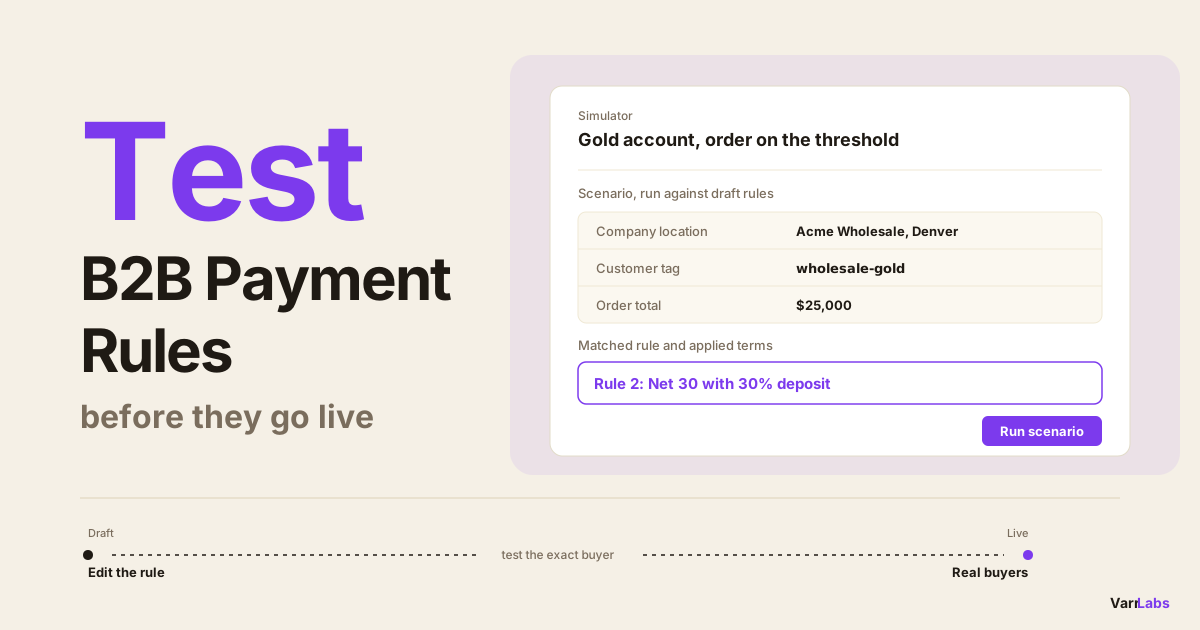
- 5TermStack's Simulator runs these scenarios against draft or published rules without test orders, with one-click rollback and an audit log.
Changing payment terms rules is the part of Shopify B2B setup that makes people nervous, and it should. A rule that's wrong doesn't throw an error. It quietly gives a new account Net 60, or asks your best customer for a 30% deposit, and you find out when they email you.
The usual way to test payment rules on Shopify is to publish and watch the next few orders. That's testing on real buyers. Shopify has no built-in preview of which terms a given buyer will get once rules run at checkout, so most merchants and agencies either skip testing or place a handful of fake orders.
This post is the workflow I use instead: draft the change, simulate the exact buyer, push on the edges of every threshold, publish, confirm with one real checkout, and know how to roll back before you need to.
Why testing payment rules on Shopify is hard
Payment terms on Shopify Plus are resolved at checkout, from context. Who is logged in, which company location they're buying for, the order total, their tags, whether they've ordered before. Change one of those and the terms can change.
That makes rules hard to reason about in your head. With first-match rules, the rules are checked top to bottom and the first one that matches wins. Adding one rule can change the outcome for orders that have nothing to do with the rule you were thinking about, because it now sits above them.
Natively, the only way to see what a buyer gets is to check out as that buyer. You can open a company location and read its terms, but that tells you what's stored, not what checkout will do once rules sit on top. Agencies building a custom Payment Customization Function can run it locally against sample input, which tests the code but not the merchant's real companies and tags.
A rule change is a checkout change. Test it against real buyers before it reaches them.
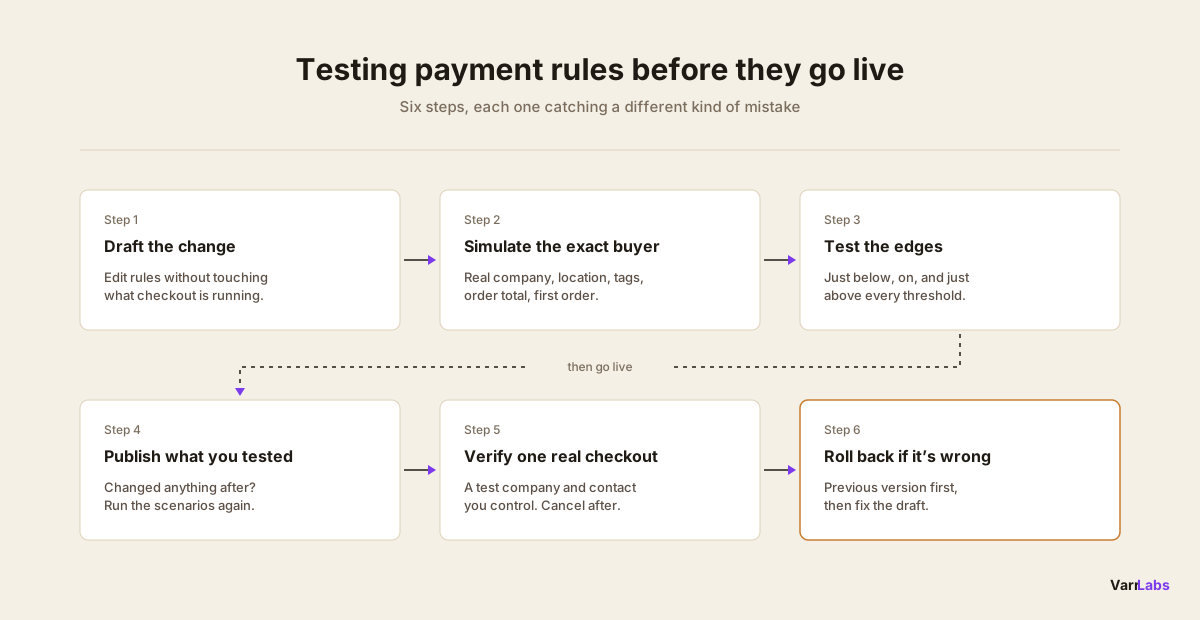
The workflow for testing B2B payment rules
Here's the full loop. Each step catches a different class of mistake, so don't skip ahead.
- Draft the change. Edit the rule without touching what checkout is running.
- Simulate the exact buyer. Run the real company, location, tags, order total, and first-order status.
- Test the edges. Run each threshold just below, on, and just above the number.
- Publish. Make the tested version live.
- Verify with one real checkout. Place one test order as a buyer you control.
- Roll back if it's wrong. Put the previous version back in one click, then fix the draft.
1. Draft the change, don't edit live
The first rule of testing is that editing and going live should be separate steps. If saving a rule immediately changes checkout, every typo is a production incident.
Keep your edits in a draft until you've tested them. That's also the moment to write down what you expect: which buyers should be affected, which shouldn't, and what terms each should get. If you can't say what the change should do, you can't test whether it did it.
2. Simulate the exact buyer scenario
Here's a concrete rule set. Say Harbor Supply runs three rules, top to bottom, and keeps the location's own terms when nothing matches:
- First order, apply Net 30 with a 50% deposit.
- Order total is $25,000 or more, apply Net 30 with a 30% deposit.
- Customer tag is
wholesale-gold, apply Net 60.
Rule 2 is the new one. Finance wants a deposit on big orders, and they've put it above the gold rule so gold accounts pay one too. Rule 1 is the first-order prepayment pattern, and it sits at the top.
Don't test that with a made-up buyer. Pick a real gold account, its real location, and a real order total, then run it against the draft. The point is to test the context checkout will see, including the tags and order history you've forgotten about.
3. Test just above and below every threshold
Thresholds are where rules break. "Greater than $25,000" and "$25,000 or more" behave differently on a $25,000 order, and nobody notices until that exact order comes in. The payment terms by order value post covers how to pick those numbers in the first place.
For every number in a rule, run three scenarios: one just below, one exactly on it, and one just above. For Harbor Supply's change, the scenario table looks like this:
| Scenario | Expected terms | Rule that should match |
|---|---|---|
| Gold account, repeat buyer, $24,999 | Net 60 | 3 |
| Gold account, repeat buyer, $25,000 | Net 30 with 30% deposit | 2 |
| Gold account, repeat buyer, $25,001 | Net 30 with 30% deposit | 2 |
| Gold account, first order, $30,000 | Net 30 with 50% deposit | 1 |
| Untagged account, repeat buyer, $8,000 | The location's own terms | None |
Tagged Wholesale Gold by mistake, $8,000 | The location's own terms | None |
The fourth row is the kind of thing testing is for. A first-order gold account placing a $30,000 order gets the first-order rule, not the large-order one. That might be exactly what you want, or it might not. Either way you've decided it on purpose instead of finding out from a buyer.
The last two rows test the negative case. A rule that matches too much is as dangerous as one that matches too little, and a tag spelled differently on the customer is a different tag.
4. Publish the version you tested
Once every row in the table matches, publish. Publish the draft you tested, not a draft you tweaked afterwards. If you change anything after testing, run the table again. It takes a minute.
5. Verify with one real test checkout
A simulator tells you what the rules will do. One real checkout tells you the rules are live and the buyer context is what you think it is.
Keep a test company for this, with a location and a customer contact you control on a separate email. Set it up in Customers → Companies, log in as that contact, add items that land in the scenario you care about, and check the terms shown at checkout. On a Net terms scenario with no deposit, the buyer isn't charged at checkout, so you can cancel the order afterwards. If the scenario takes a deposit, it takes a real payment, so keep the order small and refund it.
One catch: your test company only has a first order once. After it has an order on record, first-order rules can stop matching for it, so keep a second test company if you need to check both.
6. Roll back if it's wrong
Sometimes the real checkout shows something the simulation didn't, usually because a buyer's real tags or location differ from what you assumed. Don't fix forward under pressure.
Roll back to the previous published version first, so checkout goes back to what worked yesterday. Then fix the draft, rerun the table, and publish again. A rollback should be one click, not a rebuild of the old rules from memory.
Handing off tested payment rules to a merchant
For agencies, the scenario table doubles as handoff documentation. It says what each rule is for, which buyers it should catch, and which it should leave alone, in terms a finance lead can read.
Hand it over with the rules. When the merchant's team changes a rule six months later, they rerun the same table instead of guessing what the agency intended. If a result changes, they know the change did something they didn't plan.
It also helps to know who changed what. When a buyer's terms change unexpectedly, the first question is always what was published and when. The five payment terms mistakes post covers the setups that most often cause that question.
When a manual test isn't enough
Test orders work for one or two scenarios. They don't scale to six rows per change, and they leave cancelled orders in your admin.
In TermStack, the Simulator runs the testing loop without test orders. You pick the real company, customer, and location from your store, enter the order total and tags, and run it against your draft or your published rules. It shows which rule matched, the terms and deposit it applied, and the evaluation trace, so the scenario table above takes a few minutes instead of an afternoon.
Edits stay in draft until you publish. Version history lets you roll back to a previous published version in one click, and TermStack's audit log records who changed which rule and when, which is what an agency handoff needs.
TermStack's Simulator runs a real company, location, and order total against your draft rules and shows the rule that matched, with one-click rollback if a publish goes wrong. Try TermStack free for 14 days →
Quick reference: what to test before publishing payment rules
| Check | Why |
|---|---|
| The exact buyer | Real tags, location, and order history, not assumptions |
| Just below, on, and above each threshold | "Greater than" and "or more" differ on the boundary |
| First order vs repeat | First-order rules usually sit at the top and catch more than expected |
| Buyers who shouldn't match | Rules that match too much are as risky as ones that miss |
| One real checkout after publishing | Confirms the live version and the buyer context |
| A rollback plan | So a bad publish costs minutes, not a week of wrong terms |
Frequently asked questions
Summary
Test payment rules before they go live the same way every time. Draft the change, simulate the exact buyer, test every threshold just below, on, and above, publish the version you tested, verify with one real checkout, and roll back first if something's off. Write the scenarios down as a table, and it becomes the handoff document too.
- Try the live demo store → to see payment terms rules applying at a real B2B checkout.
- Want help setting up and testing your rules? I'll do it with you on a free 30-minute call: your rules, tested in the Simulator and live at checkout before the call ends. Email termstack@varrlabs.com.
As your rule list grows, TermStack keeps every change testable and reversible: a Simulator to run the scenarios, version history to roll back a bad publish, and an audit log of who changed what.