Shopify B2B Payment Terms by Order Value (Setup Guide)
How to automatically apply different B2B payment terms based on order size on Shopify Plus, using a rules engine with order-total conditions and tiered thresholds.
Key Takeaways
- 1Shopify Plus sets one payment term per company location. Every order from that buyer gets those terms, regardless of whether the cart is $200 or $200,000.
- 2Order total rules evaluate the cart total at checkout and apply different terms per tier: stricter for small orders, more flexible for large ones.
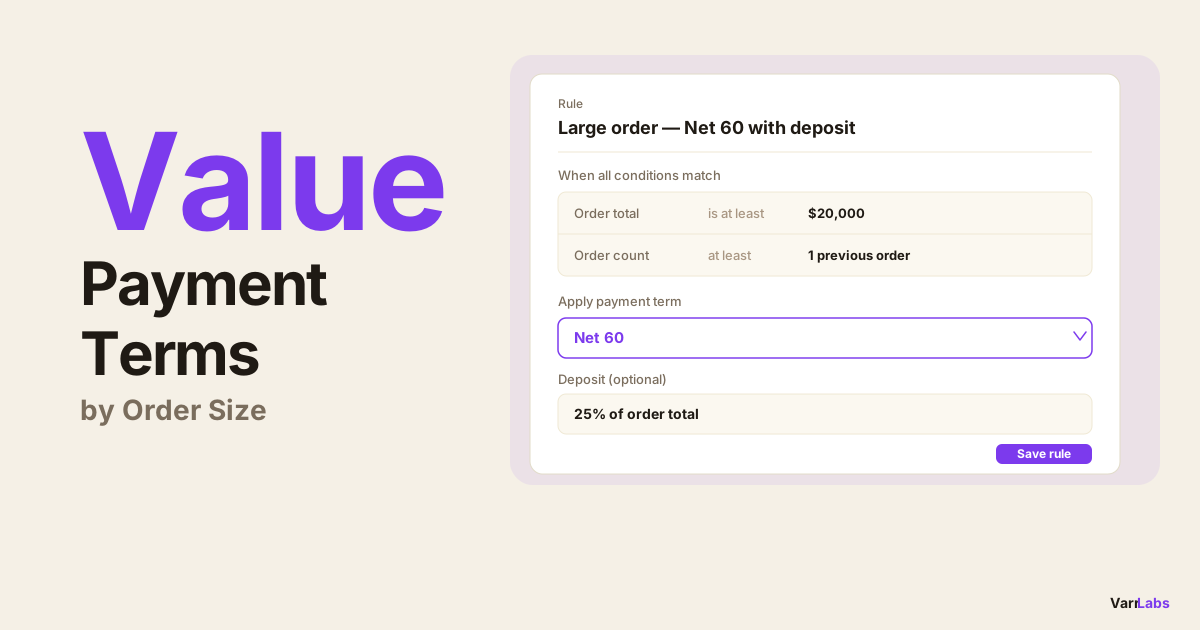
- 3Deposits can be attached to any rule outcome, so you can require 25% upfront on orders above $20,000 while still offering Net 60 for the balance.
- 4TermStack is a no-code rules engine for Shopify Plus that supports order total and seven other condition types, with a simulator to test before you publish.
Most Shopify Plus merchants I talk to want the same thing: stricter terms on small orders, more flexibility on large ones. Net 30 on a $500 test order makes no sense. But demanding full payment upfront on a $50,000 wholesale order is a deal-killer.
The problem is Shopify assigns one payment term per company location. It doesn't know if the order is $200 or $200,000. The same Net 30 applies to both, and you're stuck managing the exceptions manually.
This post explains how to set B2B payment terms by order value on Shopify Plus, what that looks like in practice, and how to set it up. For a broader overview of how B2B payment terms work, the complete guide to B2B payment terms covers the full framework.
Why static payment terms break at scale
Shopify's native B2B payment terms are configured per company location. Every order from that buyer, regardless of size, product mix, or payment history, gets the same terms.
That's fine when you're starting out. But once you have buyers ordering at different volumes, static terms create real problems.
A new wholesale account placing a $300 test order probably shouldn't get Net 60. That's a lot of risk on an unproven relationship. On the other hand, your top account placing a $75,000 annual restocking order probably should get generous terms. They've earned it, and you want to make it easy for them to buy.
With static terms, you either set the policy loose for everyone (more risk) or tight for everyone (more friction). Neither is right.
The only way to handle this natively is through draft orders or manual overrides, with someone on your team reviewing each order and adjusting terms by hand. That doesn't scale.
How payment terms by order value work
Since Shopify has no native way to vary payment terms by order size, this requires a rules engine. TermStack is a Shopify Plus app that lets you define rules evaluated at B2B checkout including rules based on the order total.
You set thresholds, and TermStack applies the right terms automatically based on what's in the cart. The evaluation runs inside a Shopify Function at checkout: deterministic, server-side, in under 5ms, with no external API calls.
The basic pattern looks like this:
- Orders under $2,000: require payment on fulfillment or a deposit upfront
- Orders $2,000 to $20,000: Net 30
- Orders above $20,000: Net 60
You can layer in other conditions too. Maybe large-order Net 60 only applies to buyers who have at least one previous order. Or maybe you require a 25% deposit on orders above $50,000 for new accounts. The rules engine supports all of this. You can even read a buyer's existing terms as a condition, so only accounts that already qualified get the bump: see conditional payment terms upgrades on Shopify Plus.
The Order Total condition
TermStack's Order Total condition compares the cart total against a threshold you define. The available comparisons are:
- Greater than or equal to — the order meets or exceeds a threshold
- Greater than — the order strictly exceeds a threshold
- Less than or equal to — the order is at or below a threshold
- Less than — the order is strictly below a threshold
- Between — the order falls within a range (inclusive on both ends)
- Equals — exact match
- Does not equal — anything except this value
For order-value tiering, you'll usually use Between to define ranges, Greater than or equal to for "above X", and Less than or Less than or equal to for "below X".
Rules evaluate top-down: first match wins. That means rule order matters. Put your most specific or most restrictive rules first, with a broader fallback at the bottom.
A real example: three-tier terms by order size
Here's how a typical merchant would structure order-value-based terms.
Rule 1: Small orders, pay on fulfillment
Condition: Order Total less than $2,000
Outcome: Due on fulfillment
This catches test orders and small replenishments. Payment is due when you ship, not 30 or 60 days later.
Rule 2: Mid-size orders, Net 30
Condition: Order Total between $2,000 and $20,000
Outcome: Net 30
Standard terms for the bulk of your wholesale volume.
Rule 3: Large orders, Net 60
Condition: Order Total greater than or equal to $20,000
Outcome: Net 60
Your biggest accounts get the flexibility they expect.
If no rule matches, you can configure a default fallback: keep whatever Shopify has at the location level, or apply a specific term you define.
Adding deposits on top of terms
Order total conditions can also trigger deposit requirements. Maybe you're comfortable with Net 60 for large orders, but you still want 25% upfront to reduce risk.
You can add a deposit to any rule outcome:
Rule: Large order, Net 60 with 25% deposit
Condition: Order Total ≥ $20,000
Outcome: Net 60 + 25% deposit collected at checkout
Deposits can be percentage-based or a fixed amount. The deposit is collected at checkout; the balance follows the payment terms. If you want to read more about how deposits work on Shopify Plus, see how to require deposits on B2B orders.
Combining with other conditions
Order Total is one condition type. Rules support multiple conditions with AND semantics, meaning all conditions must match for a rule to fire.
Some useful combinations:
Large order, but new account: Require a deposit even on Net 60.
Conditions: Order Total ≥ $20,000 AND fewer than 1 previous order
Outcome: Net 60 + 25% deposit
VIP buyer, any order size: Bypass the tiers entirely.
Conditions: Customer tag includes "vip" or "gold-tier"
Outcome: Net 60
Put this rule above the order-total rules, and it fires first for those buyers.
Specific company, large order: Custom terms for your best account.
Conditions: Company is Acme Inc AND Order Total ≥ $10,000
Outcome: Net 90
Rules evaluate in priority order. The first match wins. You can layer company-specific rules above the order-total tiers, and the tiers serve as a general policy for everyone else.
When native Shopify isn't enough
Shopify Plus sets one payment term per company location. There's no built-in way to vary terms by order size, combine multiple conditions, or require conditional deposits.
TermStack is a rules engine for Shopify Plus B2B that evaluates order total and seven other condition types at checkout, applies the right terms automatically, and keeps an immutable audit trail of every change. Try it free for 14 days →
TermStack runs as a Shopify Function, which means the rules evaluate at checkout inside Shopify's own infrastructure. No external API calls, no checkout slowdown.
Setting up order-value payment terms in TermStack
Here's how to build order-value rules in TermStack.
Navigate to Rules. In the TermStack admin, go to Rules and click New rule.
Name your rule. Give it something descriptive: "Small order, pay on fulfillment" or "Large order, Net 60". You'll see this name in the audit log.
Add the Order Total condition. Click Add condition, select Order total, then choose your comparison — less than, greater than or equal to, between, etc. — and enter the threshold.
Set the outcome. In the Outcome section, pick the payment terms type and duration. For Net terms, enter the number of days. If you want a deposit, toggle it on and enter the percentage or fixed amount.
Save and repeat for each tier. Then drag the rules into the correct priority order: most specific at the top, broadest fallback at the bottom.
Test before publishing. Use the Simulator to verify each tier fires correctly. You can enter a manual order total, pick a buyer, and see exactly which rule matches and what terms would be applied.
Publish. When the ruleset looks right, click Publish. The rules compile and deploy to Shopify's Function infrastructure. From that point on, every B2B checkout automatically gets the right terms based on order size.
Frequently Asked Questions
Summary
Shopify Plus can't vary payment terms by order size on its own. You get one term per company location, and it applies to every order.
If that's creating exceptions, manual overrides, or terms that don't reflect your actual credit policy, order-value rules are the fix. You define the thresholds, set the terms for each tier, and the rules engine handles the rest at checkout: automatically, consistently, with a full audit trail.
TermStack makes this configurable without code. Three tiers, deposits, multi-condition exceptions — you can set it up in an afternoon and publish when it looks right.