Credit Applications for New Wholesale Accounts on Shopify
A wholesale credit application workflow for Shopify: the form, references, the decision, assigning terms, and what new accounts pay until they're approved.
Key Takeaways
- 1A wholesale credit application has four steps: the form, trade references, the decision, and assigning payment terms on the company location in Shopify.
- 2Shopify stores the terms you decide on. It doesn't collect references, score credit, or make the approval decision.
- 3A company location with no payment terms assigned pays in full at checkout, so pending accounts are prepaid by default.
- 4Decide the interim policy before the first pending account checks out: prepaid, or a deposit on larger orders.
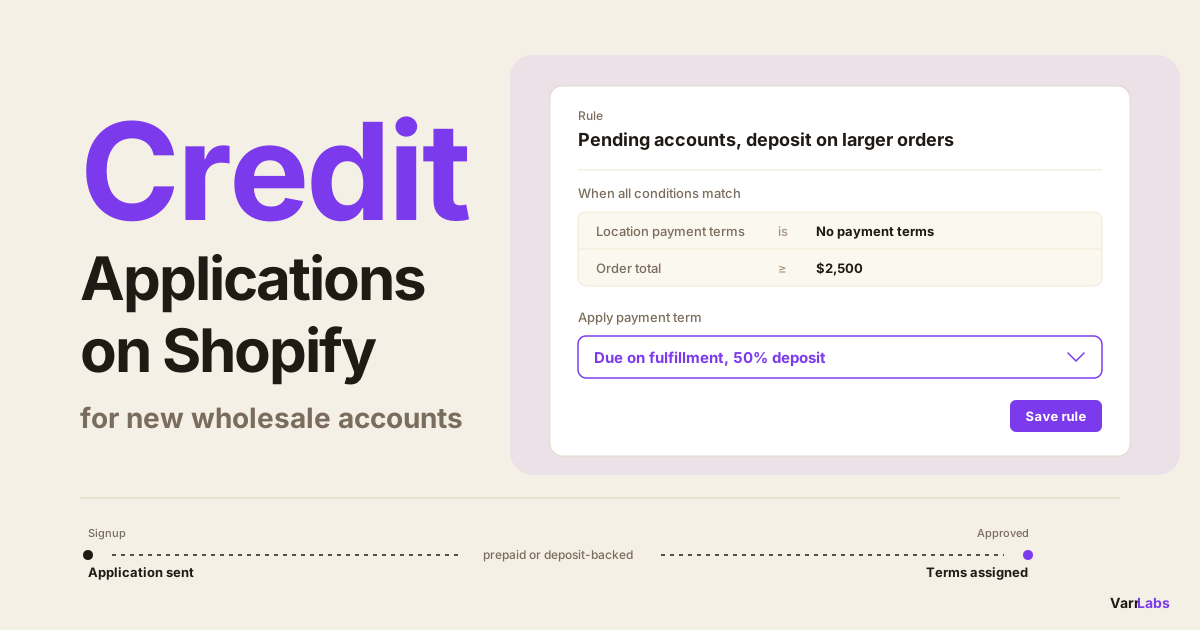
- 5TermStack can apply a deposit to accounts with no terms assigned and drop it when you assign terms. It doesn't score credit.
A new wholesale account signs up on Monday and asks for Net 30. Your wholesale credit application takes a few days to come back, because references don't answer on your schedule. The buyer wants to order on Tuesday.
What do they pay in the meantime? Most stores I talk to have a decent application form and no answer to that question. The account either waits and goes cold, or someone in sales assigns Net 30 early "just this once."
This post covers the whole gap between "new account signs up" and "account has terms": the application, the references, the decision, assigning terms in Shopify, and the interim policy that lets a pending account order safely.
What a wholesale credit application is for
A credit application is how you decide whether to lend a buyer money. That's what Net 30 is. You ship goods today and carry the cost for a month.
It's different from a credit check. A credit check is one input, a bureau report you pay for, and I've written about when a credit check is worth running. The application is the wider process: who the business is, who they already buy from, how much they want, and what you agree to give them.
Shopify stores the outcome of that process. It doesn't run it. Payment terms live on the company location, one setting per location, and Shopify applies whatever you put there to every order. The form, the reference calls, and the decision all happen outside it.
The application decides the terms. Shopify only stores them. The gap between the two is where new accounts get stuck.
The wholesale credit application workflow
Four steps. Keep each one small, because every extra field and every extra day costs you orders.
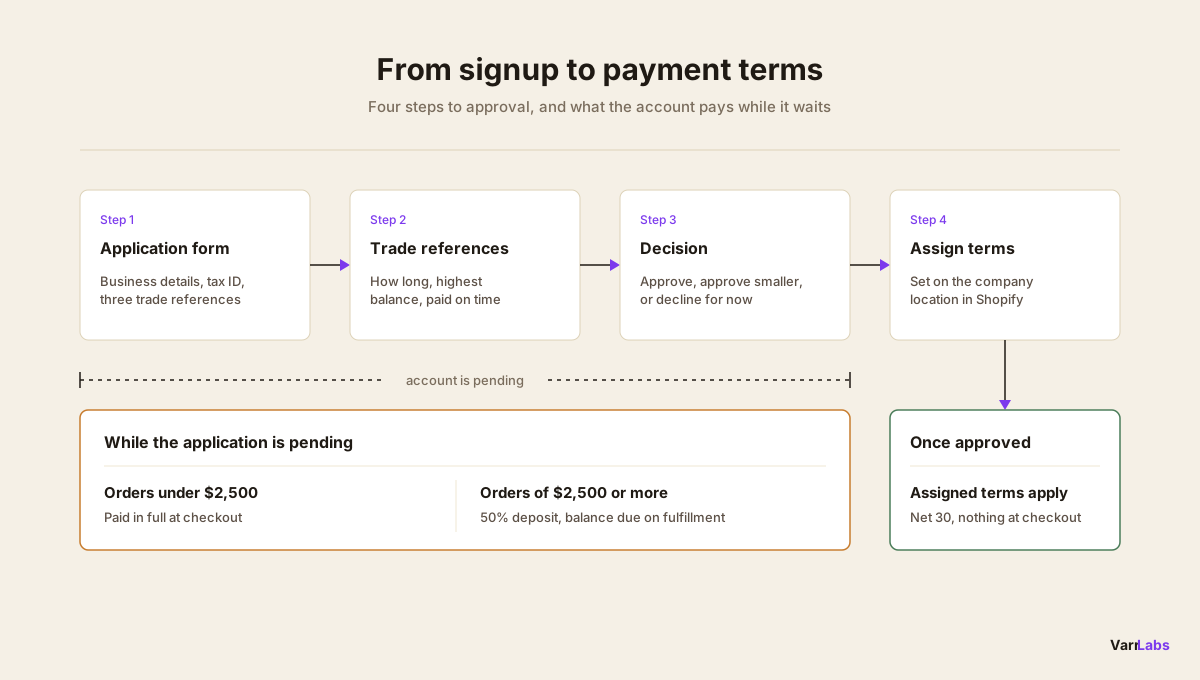
1. The application form
Ask for what you'll use and nothing else:
- Legal business name and address. The entity that will owe you money, which isn't always the name on the storefront.
- Tax or resale ID. Confirms a registered business.
- Years in business. A two-year-old shop and a twenty-year-old distributor are different risks.
- Accounts payable contact. The person who pays invoices, not the buyer who places orders.
- Requested terms and credit amount. What they want, in their words.
- Three trade references. Other suppliers who've extended them terms.
- A signature agreeing to your terms. Due dates, late fees, and what happens when an invoice goes past due.
A form on your site or a PDF both work. What matters is that it's the same form for everyone.
2. The references
Trade references are the part people skip, and they're the most useful part. Ask each one three questions: how long they've sold to this buyer, the highest balance they've carried for them, and whether invoices get paid on time.
Don't expect all three to reply. If none do, treat that as an answer too.
3. The decision
There are three outcomes, not two:
- Approve as requested. Net 30 at the amount they asked for.
- Approve smaller. Shorter terms, a lower ceiling, or terms plus a deposit.
- Decline for now. The account stays prepaid, and you look again after a few paid orders.
Write the decision down with a date and a name. When finance asks in six months why an account has Net 60, you want that answer in a file, not in someone's memory.
4. Assign the terms in Shopify
Navigate to Customers → Companies in your Shopify admin, open the company, open the location, and set its payment terms. The Net 30 setup guide walks through each screen.
Terms belong to the location, not the company. A company with three locations needs the terms set on each one, which is the detail the company vs company location post covers.
What new accounts pay before they're approved
This is the interim policy, and it needs to be decided before the first pending account tries to check out.
The native default is reasonable. A company location with no payment terms assigned pays in full at checkout. If you leave new accounts without terms until the application clears, every pending order is prepaid, and you've lent nothing.
The trouble shows up on larger first orders. Asking a buyer who's never used you to pay $6,000 upfront, in full, is a harder ask than half now and half when it ships. On Shopify Plus you can set a deposit percentage on a location, but then the interim policy becomes a manual job: set a deposit on every new location, then remember to replace it when the application is approved. That's two edits per account, and the second one gets forgotten.
Here's the honest summary of native Shopify. Prepaid until approved works with no setup. Anything in between, like a deposit on pending accounts above a certain order size, is something you maintain by hand as accounts move from pending to approved.
When native settings aren't enough
The interim policy is a rule, so I'd rather write it once than apply it account by account. That's what TermStack does on Shopify Plus: you define rules, and they run at checkout.
Say Northfield Supply sets one rule, and leaves unmatched orders on the location's own terms:
- When the location has no payment terms assigned, and the order total is $2,500 or more, apply due on fulfillment with a 50% deposit.
Here's what three orders look like:
| Order | What the buyer pays |
|---|---|
| Pending account, $1,800 | $1,800 at checkout. The rule doesn't match, so the native default applies. |
| Pending account, $6,000 | $3,000 at checkout, $3,000 due when the order is fulfilled. |
| Approved for Net 30, $6,000 | Nothing at checkout. The full $6,000 is due in 30 days. |
Approval is still one edit. You assign Net 30 on the location, the rule stops matching that account, and the deposit goes away on its own. Nobody has to remember to remove anything.
TermStack applies your interim policy at checkout to accounts with no payment terms assigned, and stops the moment you assign terms. Try TermStack free for 14 days →
There's a second way to write an interim policy, with TermStack's first-order condition. It matches a buyer with no order history and stops matching once they have an order on record. The difference matters. A first-order rule releases the buyer once they've ordered, whether or not you've approved them. A rule on "no terms assigned" holds until you decide. If approval is the gate, use the terms condition. If a paid first order is the gate, the first-order prepayment setup is the simpler one.
Now for what it doesn't do. TermStack doesn't score credit. It doesn't collect the application, call references, or pull a bureau report, and it has no opinion on whether a buyer is good for the money. That decision is yours. It enforces whatever you decided, at checkout, on every order.
Quick reference: from signup to payment terms
| Stage | What happens | Where it lives |
|---|---|---|
| Signup | Company and location created, no terms assigned | Shopify |
| Application | Form, tax ID, three trade references | Your form |
| Pending | Prepaid, or a deposit on larger orders | Native default or a rule |
| Decision | Approve, approve smaller, or decline for now | Your finance team |
| Approved | Terms assigned on the location | Shopify |
Frequently asked questions
Summary
A wholesale credit application has four steps: the form, the references, the decision, and assigning terms on the company location in Shopify. The part most stores miss is the interim policy. Decide what pending accounts pay before the first one checks out, and keep them prepaid or deposit-backed until you've approved them.
- Try the live demo store → to see payment terms rules applying at a real B2B checkout.
- Want help setting up your interim policy? I'll do it with you on a free 30-minute call: your rules, tested in the Simulator and live at checkout before the call ends. Email termstack@varrlabs.com.
As new accounts come in, TermStack's payment terms condition keeps every pending account prepaid or deposit-backed until you assign terms, without a per-account checklist.