Migrating B2B Payment Terms from Shopify Scripts to Functions
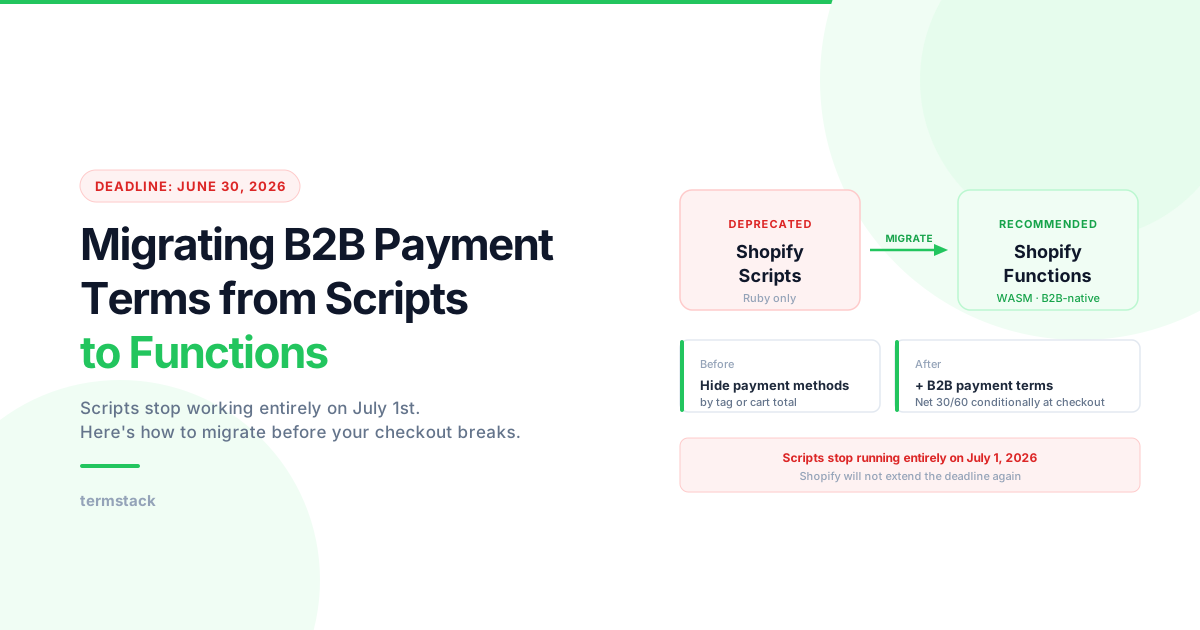
Shopify Scripts are deprecated on June 30, 2026. Here's how to migrate your B2B payment terms logic to Shopify Functions before your checkout breaks.
Key Takeaways
- 1Shopify Scripts stop running entirely on June 30, 2026 — any payment logic built on Scripts will break on July 1st.
- 2The replacement is the Payment Customization Function API, which runs as WebAssembly, supports Rust/JS, and has full B2B context that Scripts never had.
- 3For a DIY migration: audit your Scripts, map each to its Function equivalent, build with Shopify CLI, test locally, deploy before the deadline.
- 4For a no-code path, TermStack ships a Payment Customization Function and gives you a rules UI — no custom code to build or maintain.
If you built payment customization logic in Shopify Scripts, you have until June 30, 2026 to migrate.
After that date, Scripts stop working. Completely. If your B2B checkout depends on Scripts to handle payment behavior, whether that's hiding methods, applying conditional logic, or enforcing terms, it breaks on July 1st.
Here's what you need to know, and what you need to do. If you're not sure what B2B payment terms are or how they work in Shopify, start with the B2B payment terms complete guide first. If you've already got terms configured natively and want to set up Net 30 specifically, see how to set up Net 30 on Shopify Plus.
What Shopify Scripts could do for payment logic
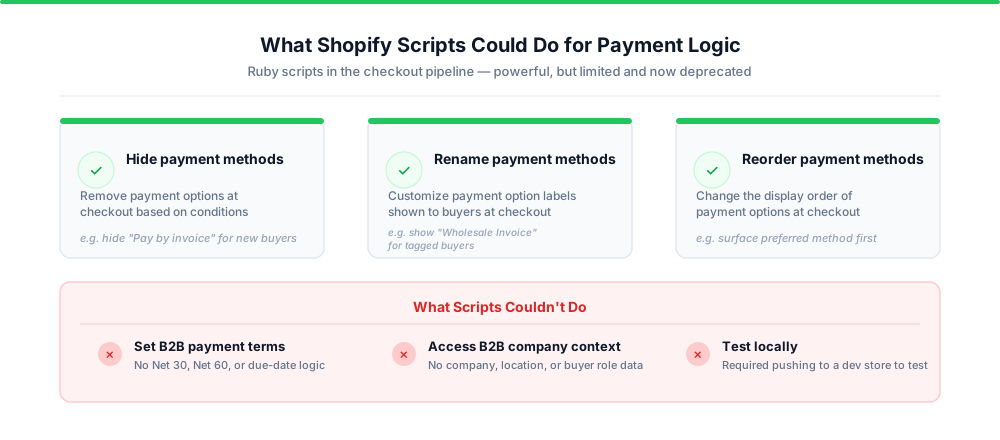
Shopify Scripts were Ruby scripts that ran in the checkout pipeline. For payment customization, they let you hide, rename, or reorder payment methods based on conditions you defined, things like customer tags, cart total, or line item properties.
For B2B merchants, a common use case was hiding certain payment methods for wholesale buyers, or showing "Pay by invoice" only when a customer had a specific tag. Some merchants also used Scripts to enforce basic payment rules at checkout based on order size.
Scripts ran server-side on Shopify's infrastructure. They were powerful for their time, but the limitations were real. Ruby-only. Opaque execution. Hard to test without pushing to a dev store. No version history. Eventually Shopify decided they weren't the right architecture for where the platform was going.
What changed with Shopify Functions
Shopify Functions are WebAssembly modules that run at specific points in the checkout lifecycle. They replaced Scripts across three domains: discounts, shipping, and payments.
For payment customization, the relevant Function is the Payment Customization API (cart.payment-methods.transform.run). It runs at checkout, reads the cart and buyer context, and returns instructions to hide, rename, or reorder payment methods. It can also apply payment terms directly.
The key differences from Scripts:
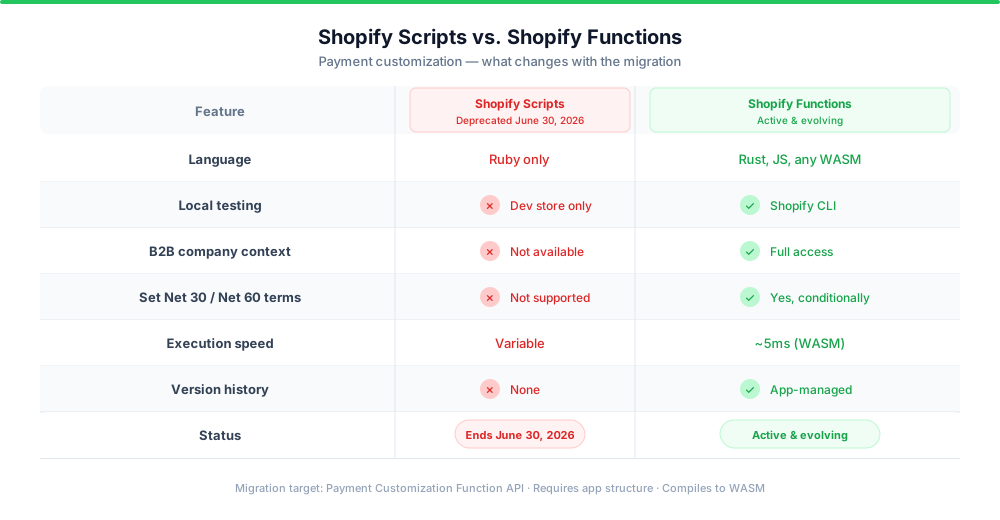
- Language flexibility. Functions compile to WASM, so you can write them in Rust, JavaScript, or any language with WASM support. Scripts were Ruby-only.
- Predictable execution. Functions have defined input/output contracts. You know exactly what data comes in and what you can return. Scripts were more freeform.
- Local testing. Shopify's CLI lets you test Functions locally with sample inputs before deploying. With Scripts, testing meant pushing to a dev store and hoping.
- Performance. Functions run in roughly 5ms. Scripts had more variable latency.
- B2B-native. Functions have access to B2B context: the purchasing company, company location, and buyer role. Scripts predated Shopify's native B2B channel, so that context simply wasn't available.
The trade-off is complexity. Functions require a proper app structure. You can't just write a few lines of Ruby in the Script Editor anymore. There's a learning curve if you're building them yourself.
The migration path
How you migrate depends on what your Scripts were actually doing.
If you were hiding or reordering payment methods conditionally, the direct replacement is a Payment Customization Function. The logic maps over cleanly. You're still evaluating conditions and returning payment method transformations. The main work is rewriting the logic in a supported language and wrapping it in an app.
If you were enforcing basic payment rules by customer tag or order total, you'll want the same Payment Customization Function. The input schema gives you access to customer tags, cart total, and B2B company data, so the conditions you were using in Scripts translate directly.
If you were applying B2B payment terms conditionally, say Net 30 for buyers above a certain spend threshold or different terms for different buyer tiers, this is where the migration gets more involved. Shopify's native B2B channel lets you set payment terms per company location, but those terms are static. Every order from that company gets the same terms regardless of context. Functions let you apply terms dynamically, based on conditions evaluated at checkout.
The steps for a DIY migration:
- Audit your existing Scripts. Identify exactly what conditions they evaluate and what they return.
- Map each Script to its Function equivalent. For payment customization, that's the Payment Customization API.
- Build the Function using Shopify CLI (
shopify app function new, select payment-customization). - Replicate your conditions in the Function input schema. Test locally with
shopify app function run. - Deploy to your development store and validate.
- Replace the Script with the Function in production before June 30, 2026.
Shopify's official migration guide covers this in detail, including the input/output schema differences.
The harder problem: conditional B2B payment terms
Here's what most migration guides gloss over.
If you were using Scripts to apply B2B payment terms conditionally, Net 30 for this buyer tier, Net 60 for that one, different terms for large orders, you can't just swap in a Function and call it done. You need to replicate the conditional logic, keep it maintained, and make sure it stays in sync with your payment policy as that policy changes.
That's not a one-time migration. It's ongoing maintenance.
Most B2B merchants I talk to have payment terms logic that evolves constantly. New buyer tiers, exceptions for high-value accounts, deposit requirements on first orders. Every time policy changes, someone is back in the code.
The Functions architecture solves the execution problem. Your terms apply at checkout in a predictable, testable way. But it doesn't solve the management problem. You still need to update logic, test changes, and deploy carefully without breaking live orders.
That's the gap purpose-built tools are designed to fill.
A faster path: use an app already built on Functions
If you don't want to build and maintain a custom Function, the alternative is an app that ships a Payment Customization Function and gives you a rules interface on top.
TermStack works this way. It ships a Rust/WASM Payment Customization Function to your store, and you configure the logic through a rules engine in the Shopify admin. No code required.
You define conditions like order total, customer tag, company, or first order vs returning, then map them to outcomes: Net 30, Net 60, Due on Fulfillment, or any combination with an optional deposit. Rules are evaluated top-down at checkout. First match wins.
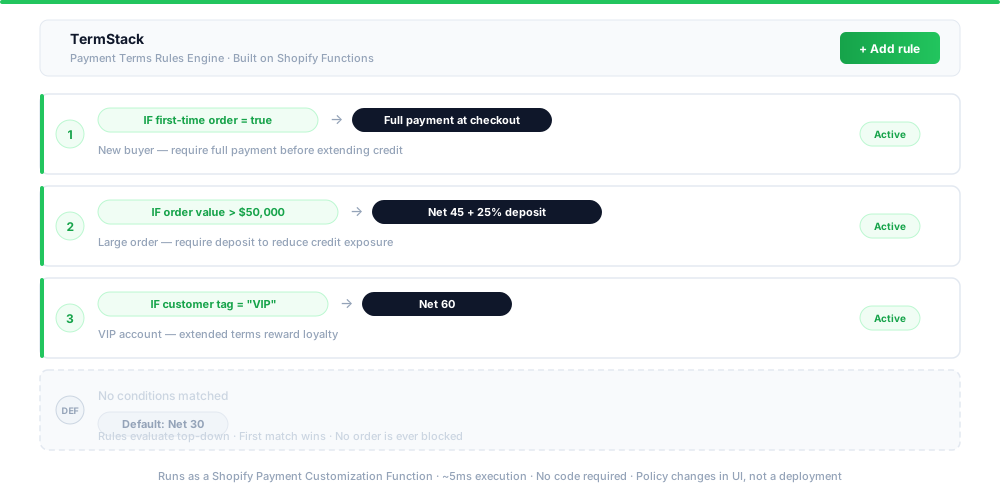
What this means in practice:
- Your payment terms migration is handled by the app's Function, not custom code you maintain.
- Policy changes happen in a UI, not a deployment pipeline.
- The simulator lets you test rule changes against sample checkouts before publishing them.
- Version history and rollback mean a bad policy change is a one-click fix.
For merchants whose Scripts were doing simple conditional payment logic, this tends to be a faster and lower-maintenance path than a DIY Function build.
TermStack handles the Function deployment and gives you a rules UI to configure your payment terms logic without touching code. Define conditions, test with the simulator, go live. Try TermStack free for 14 days →
What to do before June 30, 2026
You have roughly three months. Here's how to think about it:
This week: Audit your Scripts. Open the Script Editor in your Shopify admin, review every payment Script you have, and document what each one does. If you're not sure what's running, check with whoever built your checkout customizations.
This month: Decide whether to build or use an app. If your logic is simple and your team has dev capacity, a custom Function is straightforward. If your logic is complex, changes frequently, or you don't have dedicated dev time, an app is the better investment.
Before June 30: Test in staging, then cut over in production. Don't wait until June 29.
The deadline is real. Shopify extended it once, from August 2025 to June 2026, but there's no indication of another extension. Scripts won't just stop being supported. They'll stop running entirely.
Quick Reference: Scripts vs Functions for B2B Payment Logic
| Shopify Scripts | Shopify Functions | |
|---|---|---|
| Language | Ruby only | Rust, JS, any WASM |
| Testing | Push to dev store | Local CLI testing |
| B2B company context | Not available | Full access |
| Set payment terms (Net 30/60) | No | Yes |
| Hide / rename payment methods | Yes | Yes |
| Conditional logic | Yes (limited) | Yes (rich input schema) |
| Execution speed | Variable | ~5ms |
| Version history | None | App-managed |
| Deadline | Deprecated June 30, 2026 | Active, evolving |
Frequently Asked Questions
Summary
Shopify Scripts are going away on June 30, 2026. If your B2B checkout uses Scripts for payment logic, you have two options: build a replacement Payment Customization Function yourself, or use an app that ships one for you.
The DIY path gives you full control but requires dev time, ongoing maintenance, and careful testing. The app path — specifically tools like TermStack built on the Functions API — trades customizability for speed: your migration is handled by the app's Function, and policy changes happen in a UI rather than a deployment pipeline.
Either way, don't wait. June 30 is a hard deadline.