How to Require Deposits on B2B Orders in Shopify Plus
Shopify Plus supports deposits, but only as a static % per company location. Learn how to make them conditional by order size or buyer history, no code needed.
Key Takeaways
- 1Shopify Plus supports deposits natively, but only as a static % per company location applied to every order from that location equally.
- 2Deposit rules can be conditional: first orders, order size thresholds, specific companies, or combined AND logic.
- 3TermStack lets you configure deposit rules in a UI without writing Function code, then test them in a Simulator before going live.
- 4Always set a sensible default payment term so unmatched orders don't fall into an undefined state.
Your B2B buyer places a $40,000 order. You ship it. They get Net 60 terms. Sixty days later, you're still waiting. Your cash flow is running on the assumption they'll pay.
Most B2B merchants accept this risk silently. A deposit requirement changes the math.
This post covers exactly how deposits work on Shopify Plus for B2B orders, what's native vs what you need a Function to handle, and how to set up conditional deposit rules that actually work at checkout. If you're new to B2B payment terms entirely, the complete guide to B2B payment terms on Shopify Plus covers the full landscape.
What a deposit does (and doesn't do) in B2B
A deposit isn't a payment method. It's a condition you attach to a checkout: the buyer authorizes a partial payment upfront, and the rest is collected later via your normal Net 30/60/90 terms.
In B2B, deposits are most useful for:
- New buyers you haven't extended credit to yet
- Large orders above a certain threshold
- Product categories with high fulfillment costs
- Buyers with a history of late payments
The goal isn't to protect yourself from every customer. It's to apply friction where the credit risk is actually higher.
What Shopify Plus gives you natively
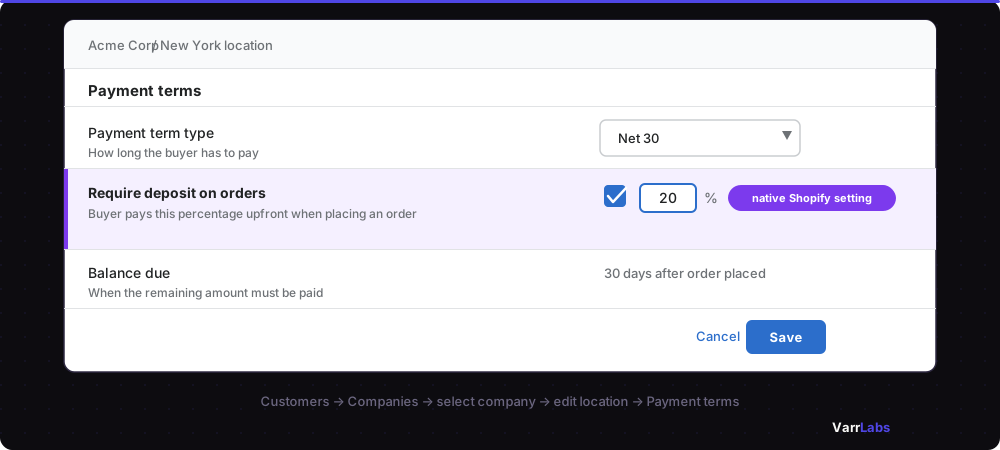
Shopify Plus has a built-in payment terms system for B2B companies. You go to Customers → Companies → [Company] → Location and set a payment terms option: Due on Receipt, Net 7, Net 15, Net 30, Net 60, or Net 90. For a walkthrough of the native setup, see how to configure Net 30 on Shopify Plus.
You can also enable a deposit on any company location. Set a percentage (e.g. 20%) and every order from that location requires the buyer to pay it upfront at checkout. Shopify records the order as Partially paid and the remaining balance is due according to the payment terms.
That covers a lot. But it's a blunt instrument: one fixed deposit % applied to every order from that company, regardless of size, buyer history, or what's in the cart.
| What Shopify Plus can't do natively | What that means |
|---|---|
| Conditional deposits | Same % applies to every order, not conditionally based on order size |
| Conditional payment terms | Every order from a company location gets the same terms |
| Different terms per order | A $500 reorder and a $200,000 first purchase get identical treatment |
So if you want a buyer to put 25% down on orders over $10,000 but no deposit on smaller reorders, you can't do that with the native settings alone. You need to go a layer deeper.
The layer that makes deposits conditional: Payment Customization Functions
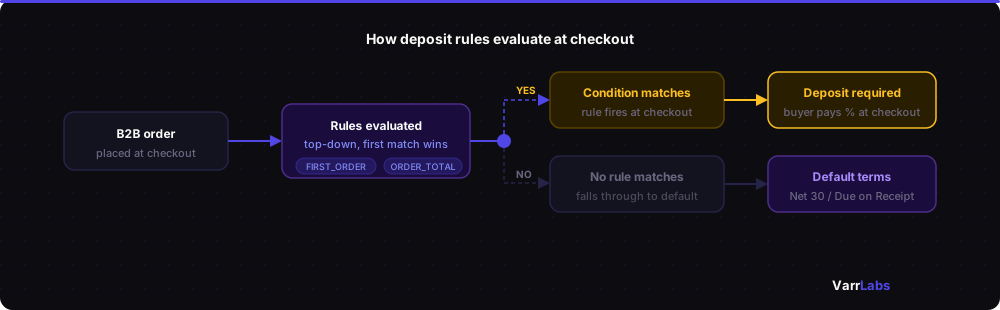
Shopify's native deposit is static: the same % for every order from a company. The Payment Customization Functions API is what makes deposits conditional.
This API lets you write logic that runs at every checkout and modifies the available payment methods. For deposit requirements, this means you can:
- Trigger a deposit only when specific conditions are met (order total, first order, buyer type)
- Apply a different deposit % based on order size
- Skip the deposit entirely for trusted companies while keeping it for everyone else
The logic runs server-side at checkout time, so it's fast and enforced. Buyers can't skip it.
Building a custom Function takes a developer who knows Rust or WebAssembly, plus an app with Shopify admin access to configure the rules. That's a significant lift if you just want to require a 20% deposit on first orders. Note that if you're currently using Shopify Scripts for payment customization, those are deprecated on June 30, 2026; see the migration guide from Shopify Scripts to Functions.
Setting up deposit rules without custom dev
TermStack is a Shopify Plus app built entirely on the Payment Customization Functions API. Instead of writing Functions code, you define rules in a UI, and the Function evaluates them at every checkout.
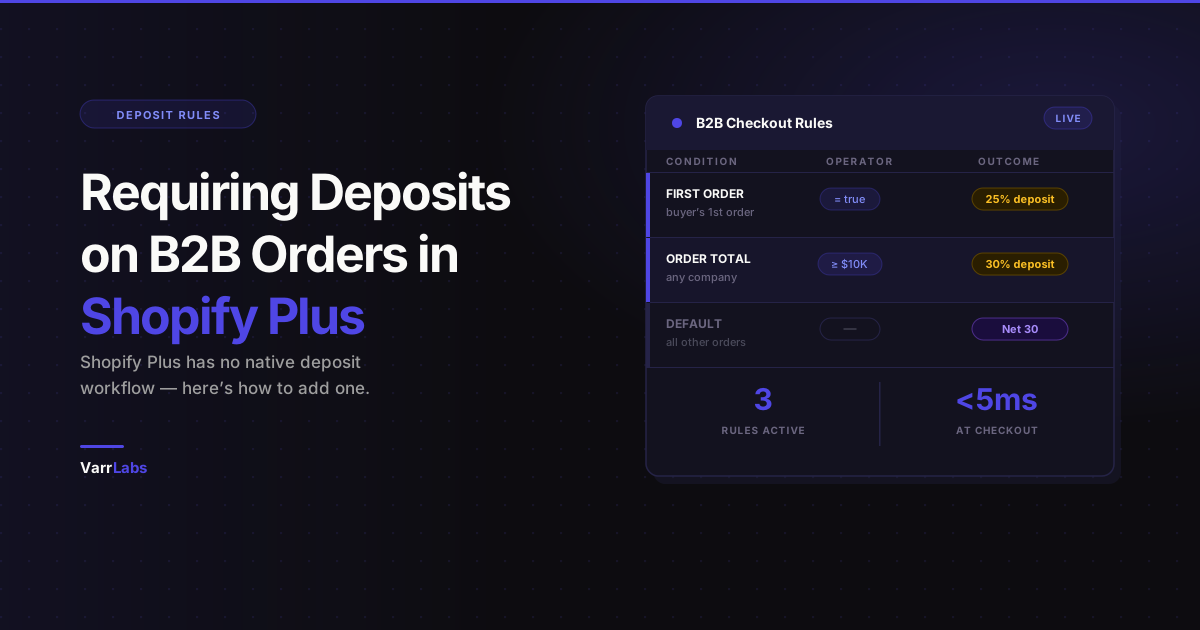
For deposits, you can set a rule like:
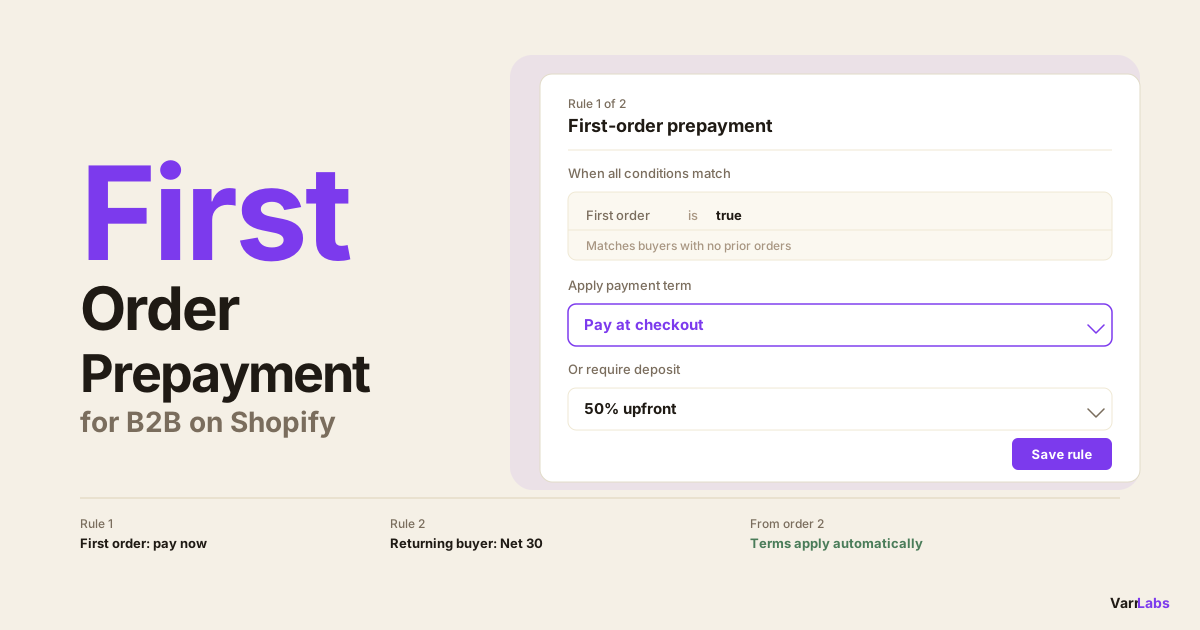
Condition: FIRST_ORDER = true
Outcome: Require 25% deposit
Or:
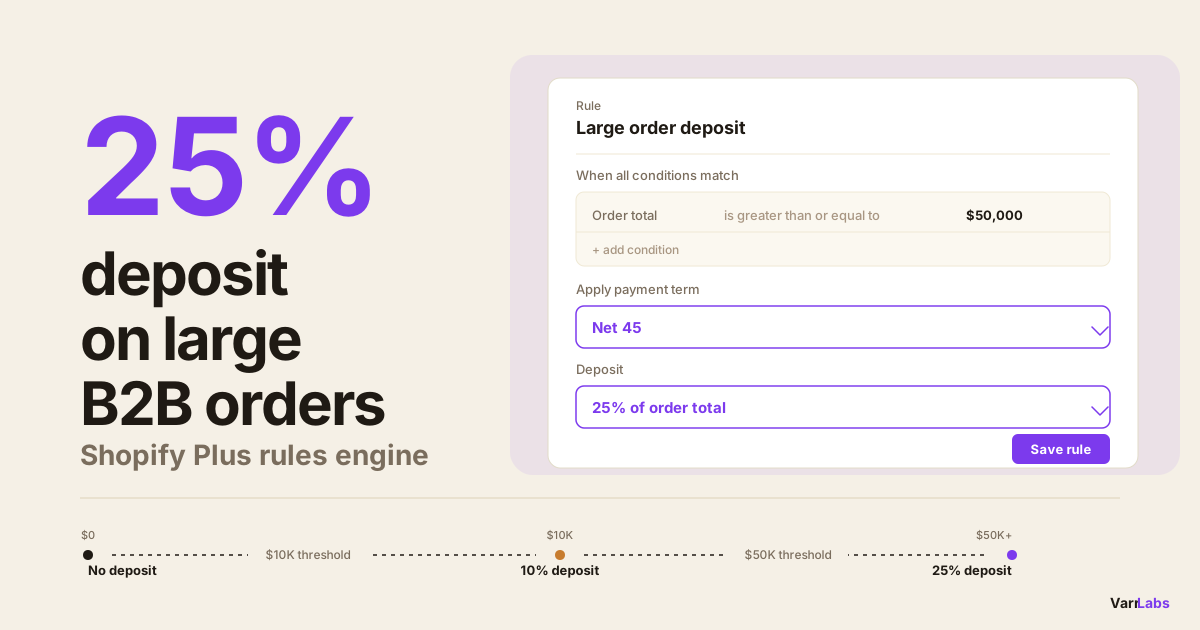
Condition: ORDER_TOTAL >= 10000
Outcome: Require 30% deposit (fixed or percentage)
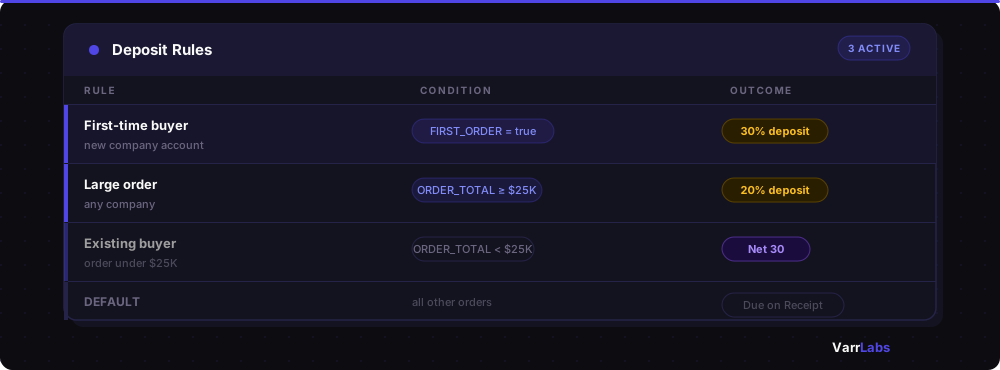
Rules are evaluated top-down. The first matching rule wins. So you can stack them:
- First-time buyers: 30% deposit
- Orders over $25K: 20% deposit
- Existing buyers under $25K: Net 30, no deposit
- Default: Due on Receipt
Each rule is a draft until you publish it. Publishing creates an immutable version, so you can test a ruleset in the Simulator before it ever touches a live checkout.
TermStack lets you define deposit conditions by order value, buyer type, or company and applies them automatically at every checkout. No Rust, no WebAssembly, no developer required. Try TermStack free for 14 days →
Practical deposit configurations worth knowing
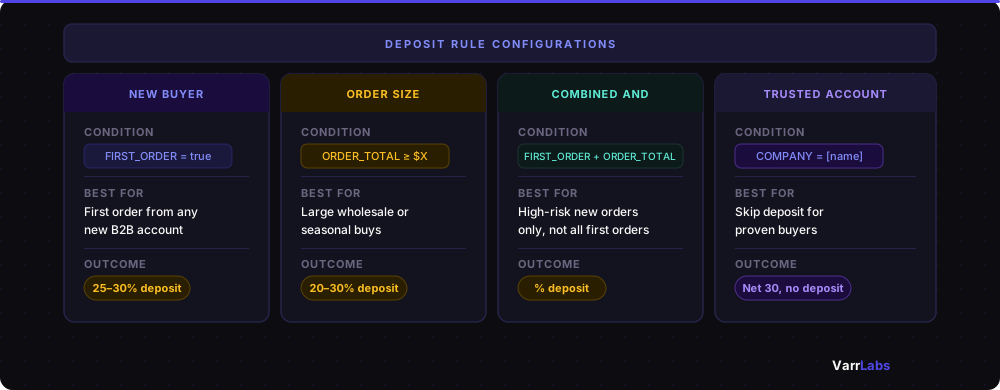
| Rule type | Condition | Typical outcome | Best for |
|---|---|---|---|
| New buyer protection | FIRST_ORDER = true | 25–30% deposit | Extending credit to unknown buyers |
| Order size threshold | ORDER_TOTAL >= $X | 20–30% deposit | Large wholesale or seasonal buys |
| Combined AND | First order + ORDER_TOTAL >= $5K | % deposit | High-risk new orders only |
| Trusted buyer override | COMPANY = [name] | Skip deposit, Net 30 | Established accounts |
New buyer protection:
Use FIRST_ORDER = true to require a deposit on the first order from any B2B company. Once they have an order history, the rule stops applying. This is the most common starting point for merchants extending credit to unknown buyers.
Order size threshold:
Use ORDER_TOTAL >= [amount] with a deposit requirement. This is common for wholesale accounts. Small reorders get standard Net 30 terms, but large orders (new inventory bets, seasonal buys) get a deposit requirement. The threshold depends on your margin and fulfillment cost.
Combined conditions:
Rules support AND logic across multiple conditions. So "first order AND order total >= $5,000" gives you a deposit trigger that's specific to high-risk new orders, not every first order.
Company-specific overrides:
If a buyer has earned unconditional Net 30 trust, add a COMPANY = [specific company] rule above the deposit rules. Their orders hit the company match first and skip the deposit logic entirely.
What buyers see at checkout
When a deposit rule applies, the buyer sees the deposit payment option at checkout. They authorize the deposit amount and the remaining balance is handled outside checkout: via invoice, payment request, or your normal billing cycle.
This keeps the checkout UX clean. The buyer doesn't see your internal risk logic, they just see the payment option that applies to their order.
A few things to get right before you go live
Test with the Simulator first. Before publishing any deposit rule, run it against sample checkouts. The Simulator in TermStack lets you pick a company, set an order total, and preview which rule fires. A misconfigured rule that blocks a $40K buyer at checkout is worse than no rule at all.
Set a sensible default. If no rule matches, what happens? Set your default payment terms explicitly (usually "Due on Receipt" for unknown cases). Never let the default be "no terms set". The fail-safe catches Function errors, but not misconfigured rules.
Talk to your high-value buyers first. If you're adding deposit requirements to existing accounts, tell them before it shows up at checkout. A one-line email like "we're tightening our terms for orders over $X going forward" prevents a confused phone call from your biggest account.
The ceiling you'll hit without conditional logic
Most B2B merchants start with Net 30 for everyone and deal with late payments manually. That works until it doesn't. Usually that's when one large buyer pays late and the cash flow problem becomes urgent.
Deposits are the first layer of credit risk management at checkout. They don't replace a credit policy, but they create a natural filter that separates buyers who can commit upfront from those who can't.
Shopify Plus gives you the infrastructure. What you need is the logic layer on top, whether you build it or use an app that's already built it.
Frequently Asked Questions
Summary
Shopify Plus gives you static payment terms and a static deposit % per company location. That's useful, but a blunt instrument once you need deposits to vary by order size, buyer history, or risk level. Making deposits conditional means going beyond the native admin and using the Payment Customization Functions API.
The practical path for most merchants: define your deposit conditions (first orders, large orders, specific companies), implement them as rules in TermStack, test them in the Simulator, and publish. No Function code, no developer required. Your deposit policy runs automatically at every B2B checkout from day one.