B2B Payment Terms on Shopify Plus: The Complete Guide
47% of B2B invoices get paid late. Learn how payment terms work on Shopify Plus, where the native setup falls short, and how to automate them with rules.
Key Takeaways
- 1Shopify Plus supports static payment terms per company location (Net 30, Net 60, etc.) but can't vary terms by order value, buyer tier, or product type.
- 2Dynamic rules replace manual decisions — define conditions like order value, customer tags, or company, and the right terms apply at every checkout automatically.
- 3Deposits reduce credit risk and filter out speculative orders. A 25% deposit on a $100K order puts $25K in your account immediately.
- 4TermStack is a rules engine built on Shopify Functions that automates B2B payment terms at checkout in under 5ms, with fail-safe behavior and full audit trails.
If you run B2B on Shopify Plus, you've probably had this moment: a buyer places a $40,000 order, your finance team scrambles to figure out what terms they're supposed to get, and someone ends up manually creating a draft order with a custom invoice attached.
It works. Until it doesn't. And once you're processing 10-15 B2B orders a day, it stops working fast.
47% of B2B invoices get paid late. A big reason? Inconsistent payment terms that nobody enforces at checkout. This guide covers how B2B payment terms work on Shopify Plus, where the native setup falls short, and how to automate them with rules instead of spreadsheets.
What B2B payment terms actually are
Payment terms define when a buyer pays you. Unlike DTC where customers pay at checkout, B2B buyers expect to pay later, on agreed terms.
The ones you'll run into most:
- Net 30. Full payment due 30 days after invoice. The default for most wholesale relationships.
- Net 60. Payment due in 60 days. Common for large orders or long-standing partnerships.
- 2/10 Net 30. Buyer gets a 2% discount for paying within 10 days, otherwise full amount by day 30. That 2% for 20 days early works out to roughly 36% annualized. Whether the tradeoff makes sense depends on how badly you need cash now versus later.
- Deposits. A percentage upfront (usually 25-50%), with the rest due before shipment or within a set period.
- Due on receipt. Pay when you get the invoice.
The terms you offer directly affect three things: your cash flow, your credit risk, and whether buyers stick around. Too rigid and you lose deals. Too generous and you're funding your buyers' businesses with your own money.
What Shopify Plus gives you natively
Shopify's built-in B2B handles the basics. You can set payment terms per company location, and buyers see those terms at checkout. Go to Customers → Companies, pick a company, edit the location, and set the payment terms. Net 30, Net 60, due on fulfillment. Done. If you've ever wondered why setting a term on the company doesn't cover every buyer, it's because terms live on the location: see Shopify company vs company location.
That covers simple cases where every buyer from a company gets the same terms on every order. For a step-by-step walkthrough of the native setup, see how to configure Net 30 on Shopify Plus.
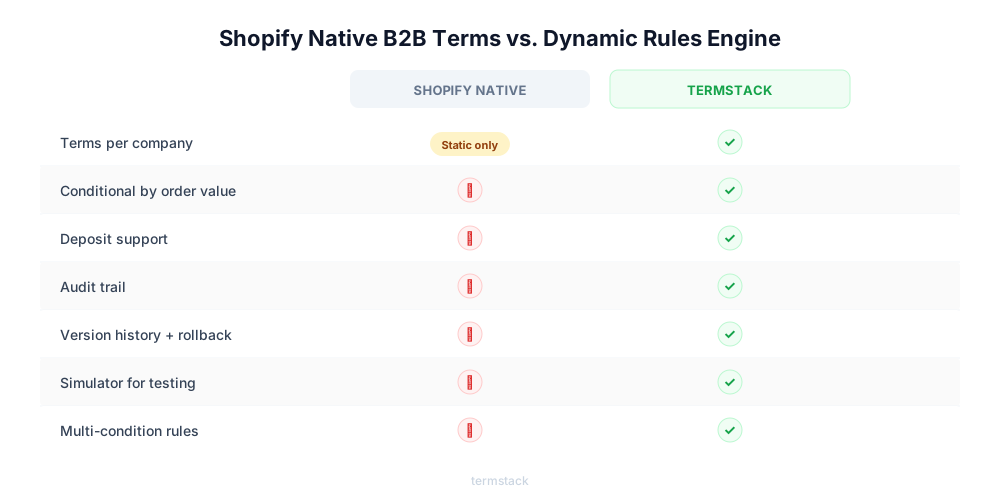
Here's where it breaks down:
| Limitation | What it means for you |
|---|---|
| Static terms per company | You can't say "Net 30 on orders under $10,000 but require a deposit on orders above $50,000." Every order from that company gets the same terms, whether it's a $500 reorder or a $200,000 first purchase. |
| No deposit workflows | There's no way to collect 50% upfront and the rest on delivery. You'd need to manually calculate the deposit, send a separate invoice, track partial payments, and reconcile it all later. |
| No enforcement | If a buyer is 90 days overdue on a $40,000 invoice, nothing stops them from placing another order at full Net 60 terms. Your team has to catch that manually. |
| No audit trail | When your finance controller asks "who changed this buyer's terms from Net 30 to Net 60, and why?" there's no answer in Shopify. No timestamp, no record of who made the change. |
As one merchant in the Shopify Community put it: "It is a start, but we need more flexibility."
Why this gets worse at scale
With 10 B2B customers, you can manage terms with a spreadsheet and a good memory. Your finance person knows every account.
At 50 customers, problems surface. Different sales reps promise different terms. Nobody remembers why Account X got Net 60. Your finance team spends hours every week chasing answers instead of managing cash flow.
At 200+ customers, the manual approach collapses. Policy drift sets in. Your sales team makes side deals that finance never approved. Cash flow forecasting becomes a guess because you don't know which invoices will actually get paid when.
The cost isn't just operational headaches. It's real money. Say you accidentally set one $50,000 order to Net 60 when it should have required a deposit. That cash is locked up for two months. That single mistake costs more than a payment terms tool at $99-$299/month for an entire year.
Dynamic payment terms: rules instead of manual decisions
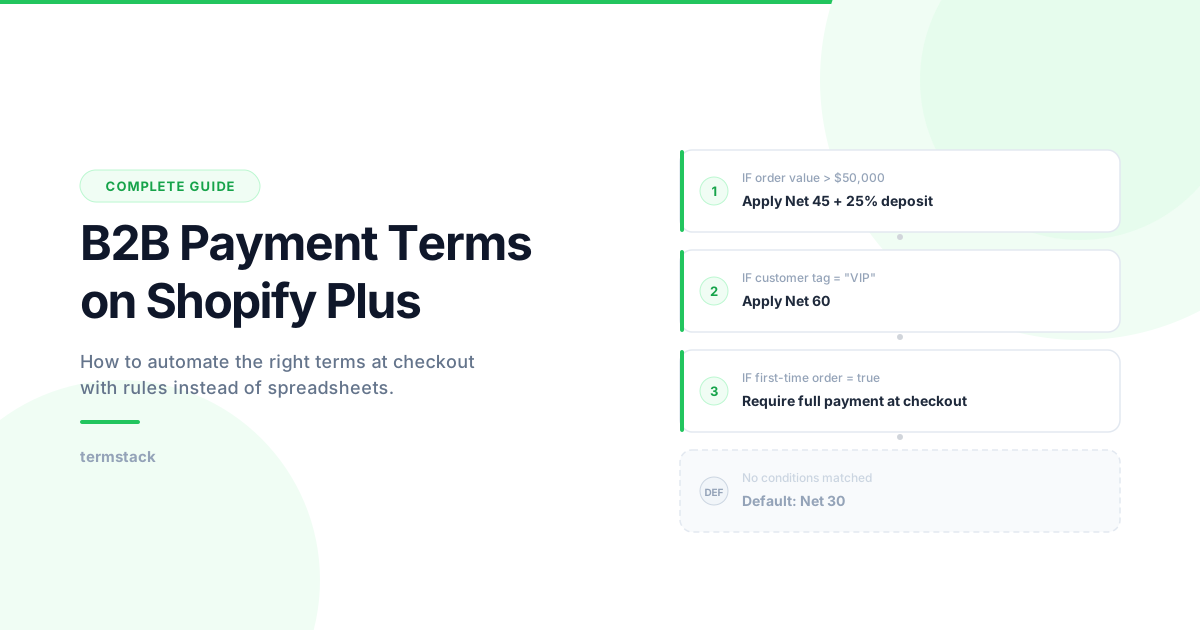
Dynamic terms replace manual decisions with rules. You define conditions and outcomes, and the system applies the right terms at every checkout automatically.
Think of it as an if-then engine for payment terms:
By order value:
- Orders under $5,000 get Net 30
- Orders over $50,000 require a 25% deposit, Net 45 on the balance
By buyer profile:
- Customer tagged "VIP" gets Net 60
- Customer tagged "High-Risk" gets due on receipt
- First-time buyer from any company gets full payment at checkout
By what's in the cart:
- Orders containing items from a specific product collection require a deposit
- Orders from only standard inventory get Net 30
By company or location:
- Acme Corp's West Coast warehouse gets Net 60
- All orders from a specific company location get custom terms
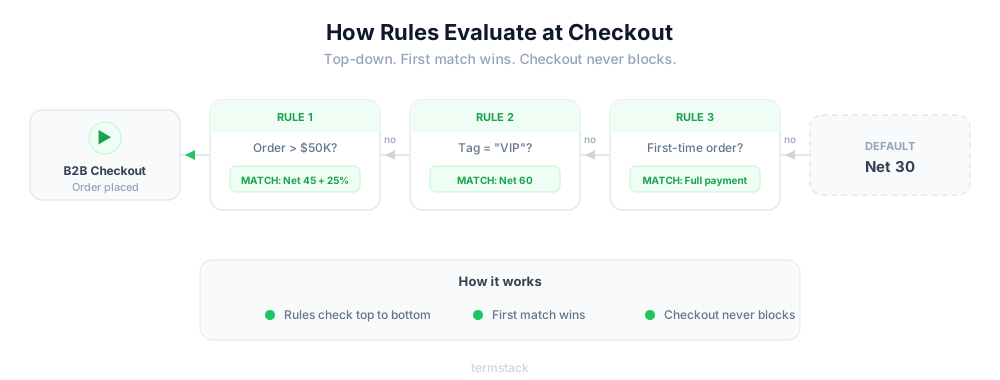
Rules evaluate top-to-bottom. First match wins. If nothing matches, checkout proceeds as normal. No human touches it.
This does three things at once: removes inconsistency (every buyer gets exactly the terms your policy dictates), eliminates policy drift (sales can't promise terms that your rules don't allow), and gives finance a process they can actually audit.
Why deposits matter more than you think
Deposits are one of the most requested features for B2B on Shopify Plus, and one of the hardest to manage natively.
Three models you'll see:
| Model | How it works | Best for |
|---|---|---|
| Deposit only | Buyer pays 50% at order, rest due at shipment | Custom manufacturing, production commits |
| Deposit + balance before shipment | 25% upfront, rest before you ship | High-value orders where you never want goods out without full payment |
| Deposit + net terms | Deposit upfront, then Net 30 on remaining balance | Balancing risk reduction with buyer flexibility |
Here's why deposits do more than reduce risk. A buyer who puts 25% down on a $100,000 order is serious. They've committed real money, which filters out speculative orders and tire-kickers. With a 25% deposit on that order, you've got $25,000 in your account immediately instead of waiting 30 or 60 days for the full amount. And for your finance team, it's a signal of buyer quality that no spreadsheet can replicate.
Right now on Shopify Plus, deposits require either manual invoicing that breaks at volume or custom development that's expensive and hard to maintain.
TermStack lets you define deposit rules by order value, company, or buyer tier — and applies them automatically at checkout. No manual invoicing, no dev work. Try TermStack free for 14 days →
How TermStack automates this
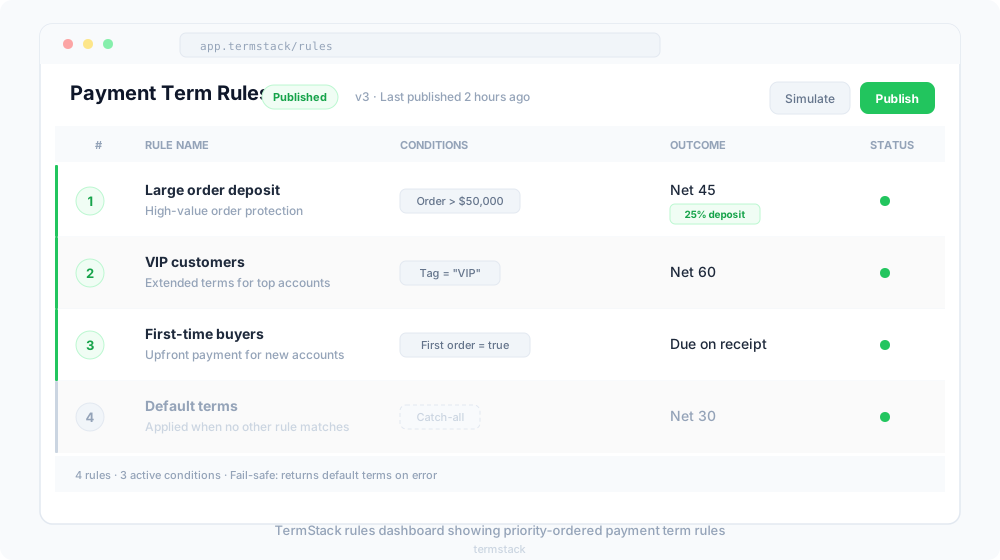
TermStack is a rules engine built specifically for B2B payment terms on Shopify Plus. Instead of managing terms manually or building custom code, you create rules in a dashboard and they apply automatically at checkout.
Each rule has two parts: a condition and an outcome.
Conditions you can build rules around:
| Condition | What you can do with it |
|---|---|
| Order value | Set thresholds like "over $10,000" or "between $5,000 and $25,000" |
| Customer tags | Match tags like "VIP", "High-Risk", or "Distributor" |
| Company | Target specific B2B companies by name |
| Company location | Apply terms to a specific warehouse or branch of a company |
| First-time order | Detect whether this is the buyer's first order from a company location |
| Total orders count | Differentiate between new buyers and repeat customers with 10+ orders |
| Product collections | Apply different terms when certain product types are in the cart |
Outcomes: Net 30, Net 60, due on fulfillment, or deposits (percentage-based or fixed amount).
You can combine conditions. A rule can say: "If this is Acme Corp, and the order is above $5,000, and it's from their West Coast location, apply Net 60 with 10% down."
Rules are evaluated top-down. The first matching rule wins. If nothing matches, your default checkout terms apply. There's no risk of blocking a transaction.
Why this is built on Shopify Functions:
TermStack runs on Shopify's official Functions API (Payment Customization). That means three things that matter to your checkout:
It's fast. The function executes in under 5ms, server-side, inside Shopify's infrastructure. No external API call during checkout. No added latency for your buyers.
It's clean. No script tags injected into your theme. No Liquid edits. Install it, configure it, remove it if you want. Nothing left behind.
It's fail-safe. If anything goes wrong, TermStack returns a NO_CHANGE response and your default checkout terms apply. The buyer always gets through. Checkout never breaks.
If you're currently using Shopify Scripts for payment customization, note that Scripts are deprecated on June 30, 2026. See our guide on migrating payment logic from Shopify Scripts to Functions before that deadline.
Audit trails: not optional for serious B2B
If a dispute arises ("I was promised Net 60, not Net 30"), your audit trail is your proof. Without one, you're in a he-said-she-said situation with a buyer you don't want to lose.
An audit trail should capture:
- Every payment term change: who made it, when, and the before/after state
- Every rule that fired at checkout: why this buyer got these specific terms on this specific order
- Every version of your ruleset: so you can roll back to a previous configuration in one click
This isn't only about disputes. For finance teams doing cash flow forecasting, knowing exactly what terms each buyer operates under is foundational. For compliance-heavy industries (pharma, food distribution), documented decision trails aren't optional.
TermStack provides an immutable audit trail for every change, with version history and one-click rollback. Every published ruleset is a snapshot you can restore.
How to set up automated payment terms
If you're ready to move past static terms, here's a practical approach:
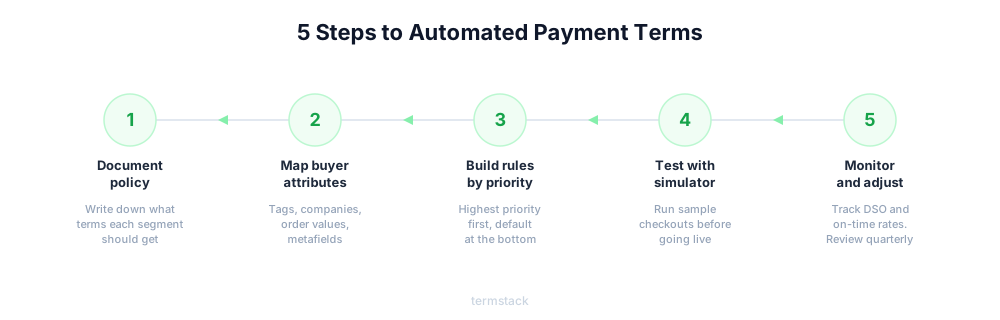
1. Document your policy first. Before you automate anything, write down what terms each buyer segment should get. What triggers a deposit? When does a buyer earn longer terms? Get your finance team to sign off on these rules.
2. Map your buyer attributes. What data will you use? Customer tags, company profiles, order value thresholds, total order count, product collections, company metafields. The more specific your attributes, the smarter your rules.
3. Build rules in priority order. Highest priority at the top, default at the bottom:
- First-time buyer? Require full payment at checkout.
- Order over $100,000? 25% deposit, Net 45 on balance.
- Customer tagged "VIP"? Net 60.
- Customer tagged "Distributor"? Net 45.
- Order contains items from custom-manufacturing collection? 50% deposit.
- Default: Net 30.
4. Test before going live. TermStack's simulator lets you run rules against sample checkouts before publishing. Does your top account still get the right terms? Does a new buyer correctly get the deposit requirement? Check edge cases, like a VIP placing their first order from a new company location. Which rule should win?
5. Monitor and adjust. Track your average days sales outstanding (DSO), on-time payment rate, and deposit collection rate. If DSO is climbing, your rules might be too lenient. If buyers are complaining, they might be too tight. Review quarterly.
Mistakes that cost real money
No written policy. If three different sales reps can promise three different terms to three different buyers, you don't have a payment terms policy. You have chaos that your finance team cleans up.
Same terms for everyone. Offering Net 30 to a $10,000/year buyer and a $1,000,000/year distributor is a missed opportunity. A distributor doing seven figures with you should get Net 60. A new reseller doing $10K should start on shorter terms and earn their way up. Segment by tags, company, and order value.
Ignoring order patterns. If you never adjust terms based on how often buyers reorder, you're missing a signal. A buyer with 20+ orders and consistent volume might deserve better terms. A first-time buyer shouldn't get the same flexibility. Use total order count to differentiate.
Underestimating deposit complexity. Deposits aren't "charge extra at checkout." You need to track partial payments, coordinate with accounting, handle failed deposit payments, and reconcile the balance when it comes due. Plan for this before you launch deposits.
No audit trail. When something goes wrong (and it will), "I think we changed their terms last month" isn't good enough. Every change needs a timestamp, an actor, and a before/after record.
Frequently Asked Questions
Summary
Static payment terms are a starting point, not a solution. Once you're past 50 B2B accounts, the gaps in Shopify's native tooling become real costs — missed deposits, inconsistent terms, and no paper trail when things go wrong.
The fix is rules, not manual decisions. Define your policy once, map it to conditions, and let checkout handle the rest. TermStack gives you that rules engine without custom code: configure conditions in the admin, simulate rule changes before they go live, and roll back instantly if something's off.
The goal isn't automation for its own sake. It's knowing that every B2B order that hits checkout gets exactly the terms it's supposed to — without your finance team touching it.