TermStack vs Manual Draft Orders: Which One Actually Scales?
Draft orders work at low B2B volume. At scale on Shopify Plus, manual payment terms overhead compounds into drift and errors. Rules-based automation fixes this.
Key Takeaways
- 1Draft orders work for B2B at low volume but require someone to touch every transaction, set terms manually, and monitor for errors.
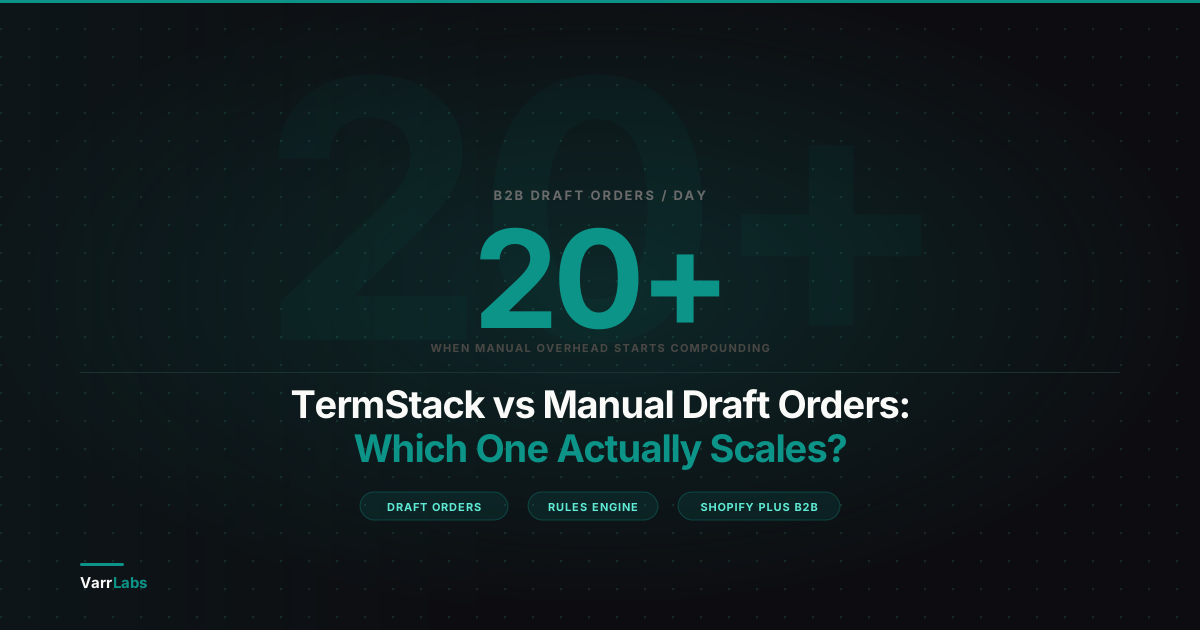
- 2At 15 to 20 B2B orders per day, the manual overhead compounds into policy drift, inconsistent enforcement, and no audit trail.
- 3TermStack applies payment terms automatically at checkout using rules you define once: customer tag, company, order total, collection, or order history.
- 4Draft orders and TermStack are not mutually exclusive. TermStack handles the standard 80% of transactions; draft orders remain for one-off exceptions.
If you're running B2B on Shopify Plus and managing payment terms, you've almost certainly used draft orders at some point. A buyer wants Net 30, you create a draft, set the terms manually, send the invoice. It works. But somewhere between 10 and 20 orders a day, it stops being a workflow and starts being a second job. That is roughly where a US toy and gift wholesaler selling to thousands of retailers decided to move their terms out of draft orders and into checkout rules.
This post compares two approaches: the manual draft order workflow that most B2B merchants default to, and a rules-based approach with TermStack. Not to trash one or sell the other, but to help you understand where each actually makes sense. For broader context on how Shopify Plus handles B2B payment terms natively, see the complete guide to B2B payment terms on Shopify Plus.
What the manual draft order workflow actually looks like
Draft orders exist for a reason. They're flexible, they don't require any setup, and they put a human in the loop for every transaction. For a merchant doing a handful of B2B orders a week with a mix of buyers who all need individual attention, drafts are a perfectly reasonable tool.
Here's how the workflow typically looks in practice.
A buyer places an order, or signals intent to buy. Someone on your team (often finance or sales ops) creates a draft order in the Shopify admin. They set the payment terms manually, send the invoice, and wait. When payment comes in, they mark it paid and fulfill.
The problem isn't that this breaks. It usually doesn't. The problem is who's doing it, how often, and what happens when something slips.
Where the draft order workflow breaks down
Draft orders require a person to touch every transaction. At low volume, that's fine. At scale, it compounds into three specific failure modes.
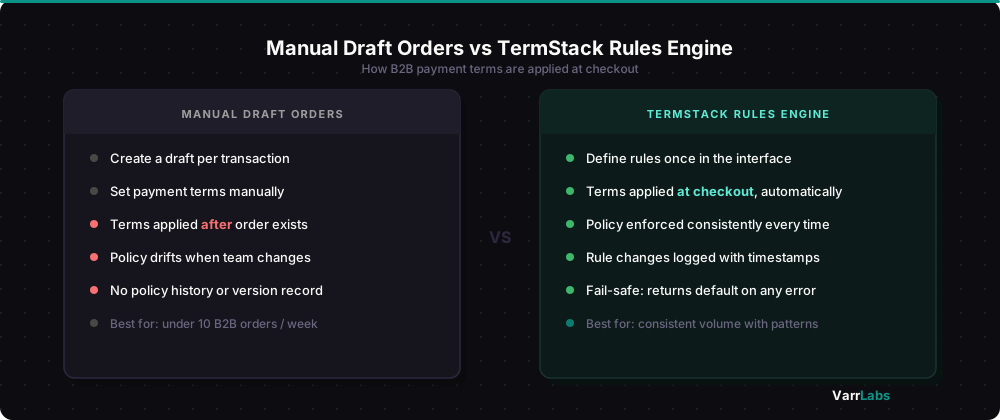
No enforcement at checkout. Payment terms in a manual workflow are applied after the order exists, not at the moment of checkout. There's nothing stopping a buyer from completing a B2B checkout and getting different terms than your policy says they should have. Your team catches it later, if they catch it at all.
Policy lives in someone's head. When terms are applied manually, the rules are usually informal. "We give Net 30 to companies over $50K orders." "New buyers get Due on Fulfillment for the first three orders." That logic lives in an email, a spreadsheet, or in the account manager's memory. When they're on vacation, it drifts.
No policy history. There's no record of what your terms policy was on a given date, or when it changed. If a buyer disputes their terms six months later, you can't point to anything written that explains the logic behind the decision.
This is the pattern most B2B merchants hit around 15 to 20 draft orders a day. The work is manageable but the cognitive overhead accumulates, errors start happening, and you realize you've built a process that requires constant human attention to not break.
How TermStack handles B2B payment terms at checkout
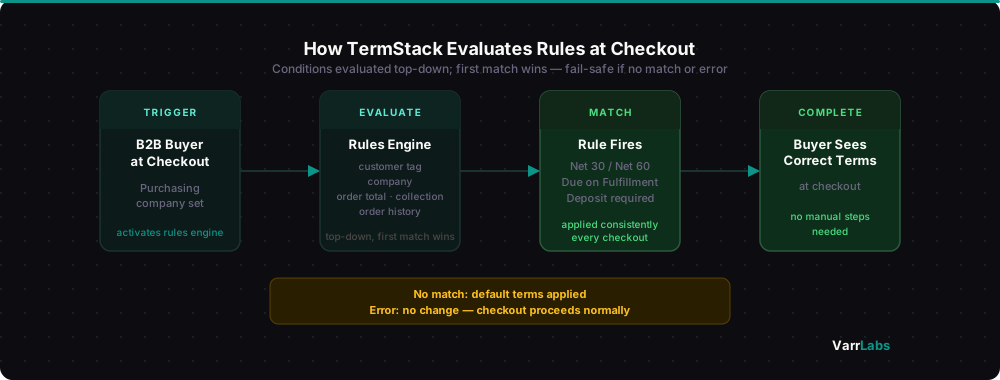
TermStack doesn't replace your checkout. It sits inside it. When a B2B buyer reaches checkout, it evaluates a set of rules you've defined and applies the right payment terms automatically.
You define the logic once. After that, it runs at every checkout without anyone touching it.
For example: all companies tagged "approved-net30" get Net 30 terms. First-time buyers get Due on Fulfillment regardless of company. Orders over $25,000 from established accounts get Net 60 with a 20% deposit. You build these as rules in the interface, publish them, and they're live.
The rules engine evaluates conditions top-down and applies the first match. Conditions include customer tag, company, order total, collection, and order history. You can combine conditions using AND logic within a rule. When no rule matches, your configured default applies. When something goes wrong at the function level, it returns no change instead of blocking checkout.
Three things this changes meaningfully:
Terms are applied before fulfillment, not after. The buyer sees the correct terms at checkout. No post-order correction, no email chain.
Policy is written down. Your rules are the policy. When you change the policy, you update the rules and publish. There's a version history so you can see what was live and when.
App changes are logged. When someone updates and publishes a ruleset, that action is recorded with a timestamp. You can see what rules were active and when they changed, which gives you a policy history that manual draft order workflows can't provide.
What the simulator changes
One objection to any rules-based system is: what if the rules are wrong? With draft orders, a human catches mistakes. With automation, mistakes can run at scale.
TermStack has a simulator for this. Before you publish a ruleset, you can run test checkouts against it using real company and customer data. You pick a buyer, pick an order scenario, and see exactly which rule fires and why. That's how you build confidence before anything goes live.
It's not a replacement for judgment. But it is the equivalent of a staging environment for your payment terms policy.
When draft orders still make sense
There are situations where draft orders are the right call, even with a rules engine in place.
One-off exceptions. A custom deal that doesn't fit any rule, such as a specific contract negotiated outside your normal policy, belongs as a draft order. Rules are for your standard operating model. Edge cases are edge cases.
Non-B2B orders. It only activates for B2B checkouts. If a buyer doesn't have a purchasing company set, it returns no change and doesn't interfere. Draft orders handle anything outside that context.
Very early stage. If you're doing 3 to 5 B2B orders a week and every buyer is different, rules may be premature. Manual review makes sense until you have enough volume to see patterns.
The honest version: draft orders and TermStack aren't mutually exclusive. Most merchants using it still use draft orders occasionally. What changes is that the standard 80% of transactions are handled automatically, and the edge cases go back to drafts where a human actually needs to be involved. If you're looking to configure specific terms natively before layering in automation, see the guide on how to set up Net 30 payment terms on Shopify Plus.
When rules-based automation isn't the right fit
Not every B2B setup benefits from a rules engine. If your buyer base is small and every deal is negotiated individually, the overhead of defining and maintaining rules doesn't pay for itself.
The right time to consider automation is when you've started to see patterns in your terms: a segment of buyers who always get the same terms, a volume threshold above which you always require a deposit, a buyer tier that qualifies for extended terms. Patterns that you'd repeat manually across dozens of transactions are patterns that belong in a rule.
TermStack enforces your payment terms policy at checkout automatically, with a full audit trail and a built-in simulator to test rules before they go live. Try TermStack free for 14 days →
Quick comparison: draft orders vs TermStack
| Manual Draft Orders | TermStack Rules Engine | |
|---|---|---|
| Setup required | None | Initial rule configuration |
| Terms applied | After checkout, manually | At checkout, automatically |
| Policy enforcement | Relies on team consistency | Rules enforced at every checkout |
| Audit trail | None | App actions and rule changes logged with timestamps |
| Error behavior | Caught by humans (sometimes) | Fail-safe: returns default, no blocked checkouts |
| Exception handling | All transactions via drafts | Edge cases still use draft orders |
| Best for | Under 10 B2B orders per week | Consistent volume with repeating patterns |
Frequently Asked Questions
Summary
The manual draft order workflow asks your team to apply consistent policy reliably across every transaction. That's hard to sustain. Every new hire, every vacation, every busy week introduces the chance for drift.
TermStack takes the consistent part off your team's plate. The rule fires the same way every time. What's left for your team are the things that actually need a human: negotiating exceptions, handling disputes, managing relationships.
If you're still in the few-orders-a-week range, the draft order workflow is fine. When you hit the point where the overhead starts to compound, that's when rules-based automation starts paying for itself.