Net 60 on Shopify Plus: When to Offer It and Limit the Risk
Net 60 closes deals but ties up cash for 60 days. Here's how to decide who gets it, what conditions to set, and how to enforce your policy at checkout.
Key Takeaways
- 1Net 60 is appropriate for established buyers with clean payment history, enterprise accounts with fixed procurement cycles, and buyers with large enough order volume to justify the carry cost.
- 2First orders from unproven buyers and accounts with slow-pay history should not get Net 60. Order size should also be a condition, not just account tier.
- 3Shopify's native payment terms apply one static setting per company location. There is no way to make Net 60 conditional on order size, order history, or account status natively.
- 4TermStack lets you encode Net 60 eligibility as rules: tier-gated, order-size-gated, history-gated, and status-aware. The right terms apply at checkout without manual intervention.
Net 60 closes deals. It also opens a 60-day window where someone else is using your cash.
If you're selling wholesale on Shopify Plus, at some point a buyer will ask for Net 60. Enterprise procurement teams often have payment cycles baked into their internal processes. They're not asking as a favor; they're telling you how their AP department works.
The question isn't whether to offer Net 60. For some buyers, it's table-stakes or you're not in the deal. The question is who gets it, under what conditions, and what guardrails you put in place so it doesn't quietly destroy your working capital. If you're weighing it against the shorter term first, see Net 30 vs Net 60 for wholesale buyers. For a full overview of how payment terms work on Shopify Plus, see the complete guide to B2B payment terms.
What you're actually agreeing to
When you ship an order and extend Net 60, you are financing that purchase for two months. The goods are gone. The money isn't there yet. Any costs you incurred to make or source that product, you're covering out of pocket until payment arrives.
For small orders, this is mostly a nuisance. For large ones, it changes the math significantly.
Say you have a buyer who places $20,000 orders every month and you've given them Net 60. At any point in time, you have two of those orders outstanding: the current month's shipment and last month's invoice still running toward its due date. That's $40,000 in receivables before a single dollar has come in.
If your cost of goods is 40%, you've deployed $16,000 of your own capital to service this one account. If they slow pay, which enterprise AP departments sometimes do toward quarter-end, that window stretches further.
None of this means Net 60 is wrong. It means it has a real cost that should be priced into who gets it and under what terms.
When Net 60 actually makes sense
Net 60 is the right call in specific situations. Here's when to offer it without much hesitation:
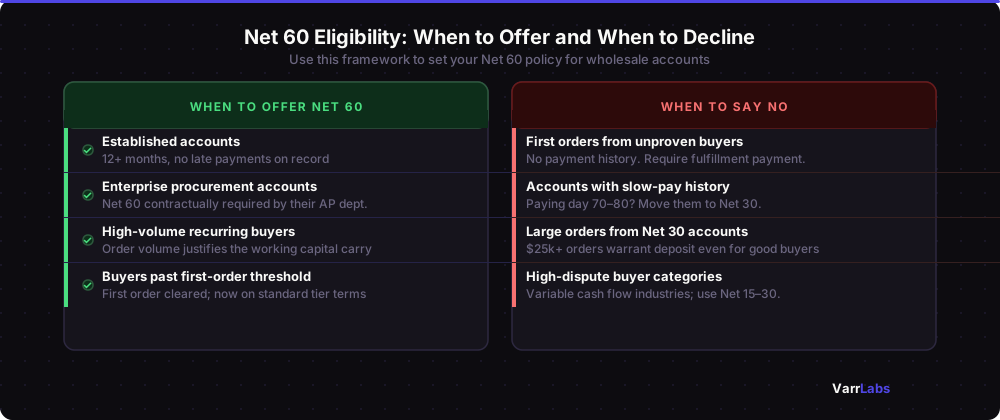
Established accounts with a clean payment history. If a buyer has been ordering from you for 12+ months and has never paid late, extending Net 60 is a reasonable reward for a proven relationship. You have data. The risk is low.
Enterprise buyers where it's contractually required. Large retail chains, government suppliers, and hospital systems often have payment terms dictated by their procurement contracts. Net 60 is non-negotiable for them. If the account is worth it, you offer the terms and build the receivable timeline into your cash flow planning.
Buyers with large enough order volume to justify the carry cost. The larger the recurring order, the more it makes sense to accommodate their payment preferences. A buyer placing $200,000 a year earns more flexibility than one placing $8,000.
Buyers who've cleared a first-order threshold. One of the cleaner policies: new accounts get tighter terms until they prove out, then graduate to Net 60 as earned. This is how most sophisticated wholesale operations run, even if they don't have it written down.
When to say no or offer something tighter
Just as important as knowing when to extend Net 60 is knowing when not to.
First orders from unproven buyers should not get Net 60. You have no history with this company. You don't know if they pay reliably, if they'll return goods, or if they'll disappear after the first shipment. Payment on fulfillment or a deposit is the right default until they've demonstrated they're worth the credit.
Buyers with a history of late payment should not stay on Net 60. If an account routinely pays on day 70 or day 80, they're already stretching terms informally. Formalizing Net 60 just tells them that's acceptable. Move them to Net 30 and negotiate from there.
High-value single orders from accounts you'd otherwise give Net 30 deserve a second look. A $50,000 order is a different risk conversation than the typical $5,000 reorder. Order size is a signal worth building into your policy explicitly.
Buyers in categories with higher dispute rates may warrant more conservative terms regardless of relationship length. Certain retail segments and newer industries with variable cash flow can carry more risk than the relationship age alone suggests.
The flat-policy problem with Net 60
Here's where most Shopify merchants go wrong. They decide a buyer gets Net 60, set it in the company location settings, and that's the end of the process. No revisit. No automatic adjustment based on order size. No downgrade if payment history degrades.
Shopify Plus's native payment terms system is intentionally simple. You set a term per company location. It applies to every order that company places, regardless of size, regardless of what's changed in the relationship, regardless of how this particular order looks relative to the risk profile.
That simplicity works at low volume with straightforward accounts. It breaks down when your wholesale business has any real nuance to it.
A few things that static terms can't express:
- Net 60 for established buyers, but only on orders under $25,000. Above that, require a 30% deposit regardless.
- Net 60 for Gold-tier accounts, Net 30 for Silver, Net 15 for everyone else.
- Net 60 after three successful orders have cleared. First order always gets payment on fulfillment.
- Net 60 suspended automatically if their last invoice went more than 15 days past due.
None of these are exotic. They're the kinds of conditions a credit manager at any traditional wholesale distributor would recognize immediately. But Shopify's native settings have no way to express any of them. You'd have to implement them manually, which means someone remembering to change settings in the right account at the right time.
Nobody does this reliably at scale.
When Shopify's native settings aren't enough
For the simple case, Shopify's native payment terms work fine. Set a term per company location, and it applies to every order. If you have a handful of wholesale accounts that all get the same treatment, that's adequate.
What native settings can't do is conditional. They can't say Net 60 only when the buyer has been with you for 12 months. They can't require a deposit on orders above a threshold. They can't automatically tighten terms when an account's payment history changes. For any of that, you need a Payment Customization Function or a rules-based app.
TermStack lets you define Net 60 eligibility as rules at checkout: tier-gated, order-size-gated, first-order conditions, and automatic downgrades for slow-pay accounts. 14-day free trial, no credit card required. Try TermStack →
The rules-based approach
The alternative is to define Net 60 eligibility as a set of explicit conditions that run at checkout, rather than as a static account setting.
Tier-gated. A customer tag like wholesale-gold or account-tier:enterprise unlocks Net 60. Everyone else gets Net 30 or tighter. When an account earns the tier tag, they automatically get the better terms. When they lose it, they revert. No manual settings changes required.
Order-size-gated. Net 60 applies up to a certain order value. Above that threshold, a deposit kicks in. The logic runs at checkout based on the actual cart total, not a setting someone made six months ago.
History-gated. The first order from any buyer gets a conservative term. After the first order clears, subsequent orders hit the standard tier rules. The system knows the order count and applies the right term without intervention.
Status-aware. An account flagged with a tag like payment-risk or slow-pay reverts to tighter terms automatically, regardless of what their normal tier would give them. You tag the account when you notice the problem; checkout enforces the consequence.
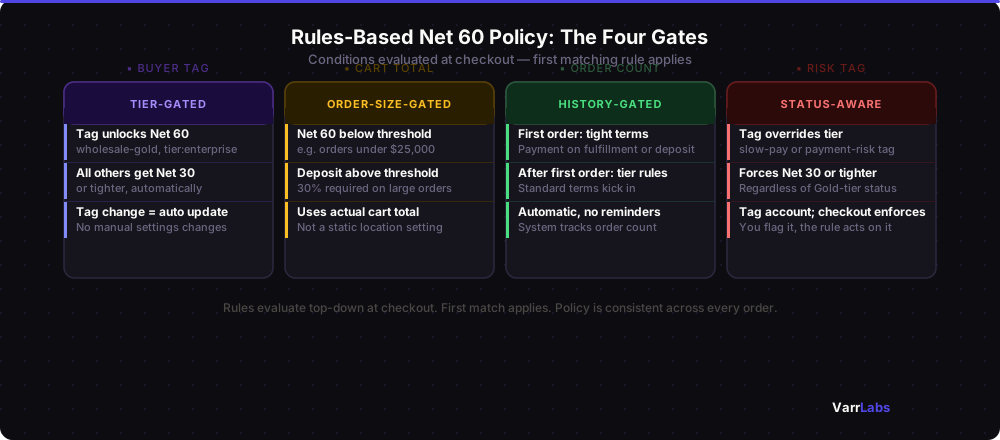
When these conditions are encoded as rules, your terms policy becomes consistent across every order. New team members can look at the rules and understand exactly what the policy is. When a buyer asks why they got the terms they got, you can point to a specific rule rather than saying "I think someone approved that."
It's also easier to update. When you want to tighten terms for new accounts or experiment with a deposit threshold on large orders, you change the rule once. It applies to every future order immediately.
Setting this up on Shopify Plus
Shopify Plus gives you two native tools. You can set payment terms per company location, which handles the simple case where every order from a given account always gets the same term. For conditional logic involving order size, order history, or customer tier, you need Shopify Payment Customization Functions.
Building a custom Function is the developer path. It works and gives you complete flexibility, but it requires a Shopify developer and ongoing maintenance as your logic evolves. For how that works under the hood, see the guide to migrating B2B payment terms from Scripts to Functions.
The no-code path is TermStack. It's a rules engine built on top of Payment Customization Functions, specifically designed for B2B payment terms on Shopify Plus. You define conditions by customer tag, order total, order history, specific company or location, and attach the payment term that should apply. The logic runs at checkout automatically.
For the Net 60 use case: create a rule that grants Net 60 to buyers with your Gold-tier tag, a separate rule requiring a deposit on orders over $20,000, and a first-order rule that routes new buyers to payment on fulfillment regardless of their tag. That covers the three main risk scenarios in one place, with no code and no manual intervention.
The cash-flow math, simplified
A useful heuristic for deciding whether Net 60 is worth it: multiply the average order value by two (the number of months terms are outstanding) and by your COGS percentage. That's roughly the working capital you're deploying to serve that account on Net 60.
A buyer placing $20,000 orders with 40% COGS ties up about $16,000 of working capital at any time. If the account is generating $80,000 a year in revenue at a healthy margin, that's a reasonable trade. If the account is marginal or volatile, the math looks different.
This isn't a reason to refuse Net 60 broadly. It's a reason to make the decision deliberately rather than by default.
Frequently Asked Questions
Summary
Net 60 is a legitimate tool for the right accounts. The mistake isn't offering it. The mistake is offering it as a blanket policy with no gates and no review mechanism.
Document your terms policy as rules rather than settings: who gets Net 60, at what order size, after what history, and under what conditions it gets suspended. Rules are auditable. When a buyer questions why they got certain terms, or when a new team member needs to understand the policy, the rules are the answer.
TermStack is the rules engine built for this on Shopify Plus. 14-day free trial, no credit card required.

