Dynamic Payment Terms and Deposits on Shopify Plus (2026 Guide)
Shopify Plus lets you set static B2B payment terms per company location. This guide explains how to add dynamic rules and deposits so the right terms apply at every checkout automatically.
Key Takeaways
- 1Shopify Plus assigns one payment term per company location. Every order from that buyer gets those terms, regardless of order size, product type, or payment history.
- 2Dynamic payment terms use a rules engine to evaluate conditions at checkout and apply the right terms automatically, based on order value, buyer tags, company, or what's in the cart.
- 3Deposits become a conditional outcome attached to specific rules, not a blanket percentage on every order. Both percentage and fixed-amount deposits are supported.
- 4TermStack is a rules engine built on Shopify Functions that evaluates rules at checkout in under 5ms with no external API calls, with full version history and an immutable audit trail.
Shopify Plus gives you B2B payment terms. What it doesn't give you is any flexibility in how those terms are applied.
You set Net 30 on a company location, every order from that buyer gets Net 30. $500 reorder? Net 30. $200,000 first purchase? Also Net 30. A buyer who's 90 days past due on their last invoice? Net 30 again.
That's the gap this post covers: what dynamic payment terms actually means on Shopify Plus, how deposits work, and how to set up rules so the right terms apply at every checkout without manual intervention. If you're new to B2B payment terms entirely, start with the complete guide to B2B payment terms on Shopify Plus.
What Shopify Plus gives you natively
Shopify's native B2B handles the basics. You set payment terms per company location, and buyers see those terms at checkout. Net 7, Net 15, Net 30, Net 45, Net 60, Net 90, Due on fulfillment, or no payment terms (pay at checkout). Each company location gets one setting.
To set it up: Customers → Companies → [Company] → [Location] → Edit payment terms.
That covers the simple case: one buyer, one agreement, consistent terms on every order. For many merchants starting with B2B, this is enough.
Here's where it breaks down:
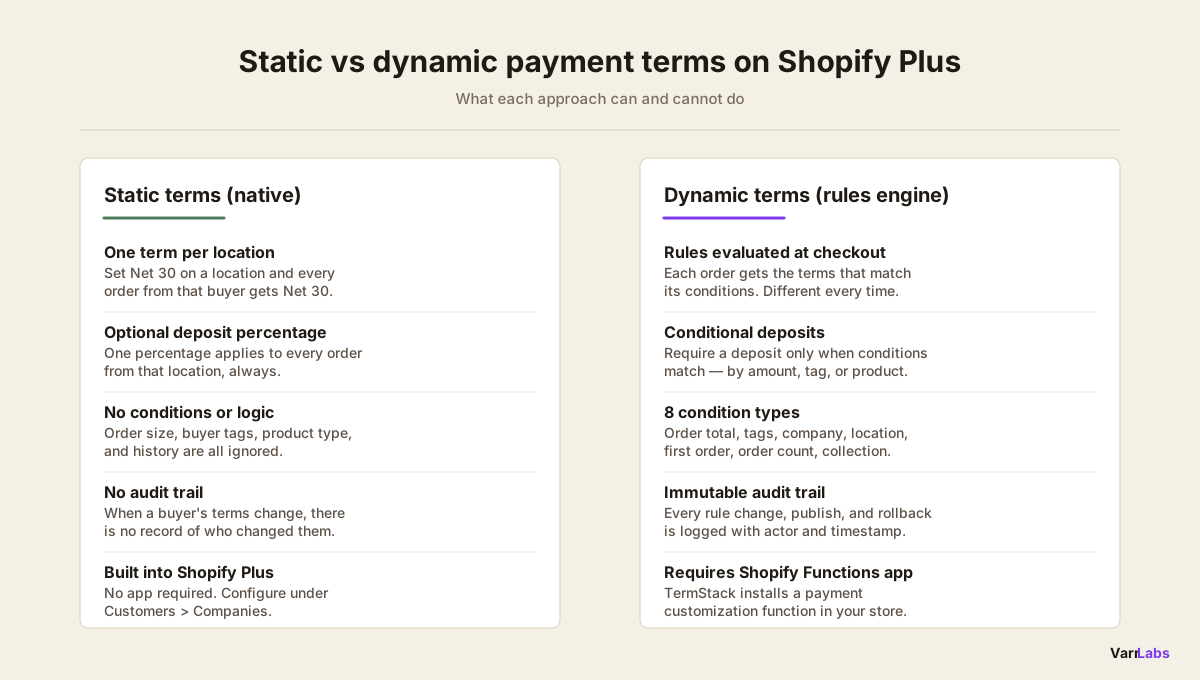
- Static per location. You can't vary terms by order size, product type, or buyer behavior. Every order from a location gets the same terms.
- No conditional deposits. Shopify doesn't let you say "require a 25% deposit on orders above $50,000." You can set a deposit percentage on a location, but it applies to every order equally.
- No enforcement logic. A buyer who's overdue on a previous invoice can still place another order at Net 60.
- No audit trail. When someone changes a buyer's terms from Net 30 to Net 60, there's no record of who did it or why.
What dynamic payment terms means
Dynamic payment terms means rules replace manual decisions. Instead of assigning a fixed term to a company location and hoping it's always the right call, you define conditions and outcomes. The right terms apply at checkout automatically, based on what's actually true about that order.
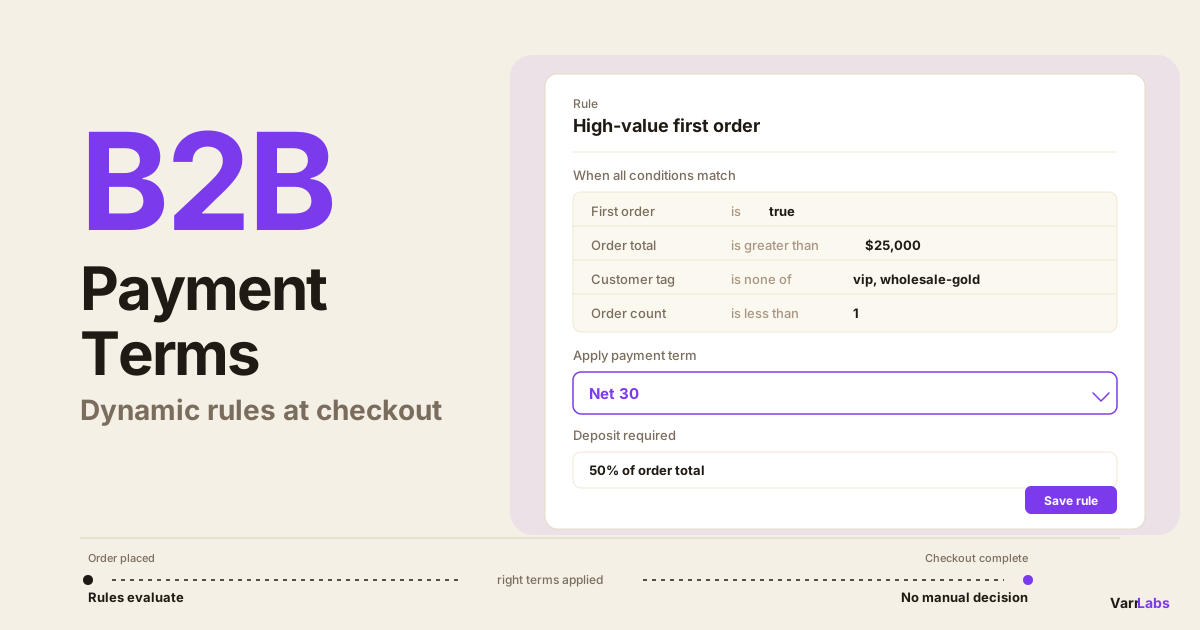
The condition types you can work with in a rules engine like TermStack:
- Order total: different terms for different order sizes (e.g., under $5,000, between $5,000–$50,000, above $50,000)
- Customer tags: VIP buyers, high-risk flags, wholesale tiers
- Company or company location: specific accounts with custom negotiated agreements
- First order: new buyers who haven't established payment history
- Total order count: buyers who've proven they pay on time
- Product collections: custom or made-to-order products that warrant deposits
- Buyer's existing payment terms: buyers who already have a specific payment term at the location level get matched against that
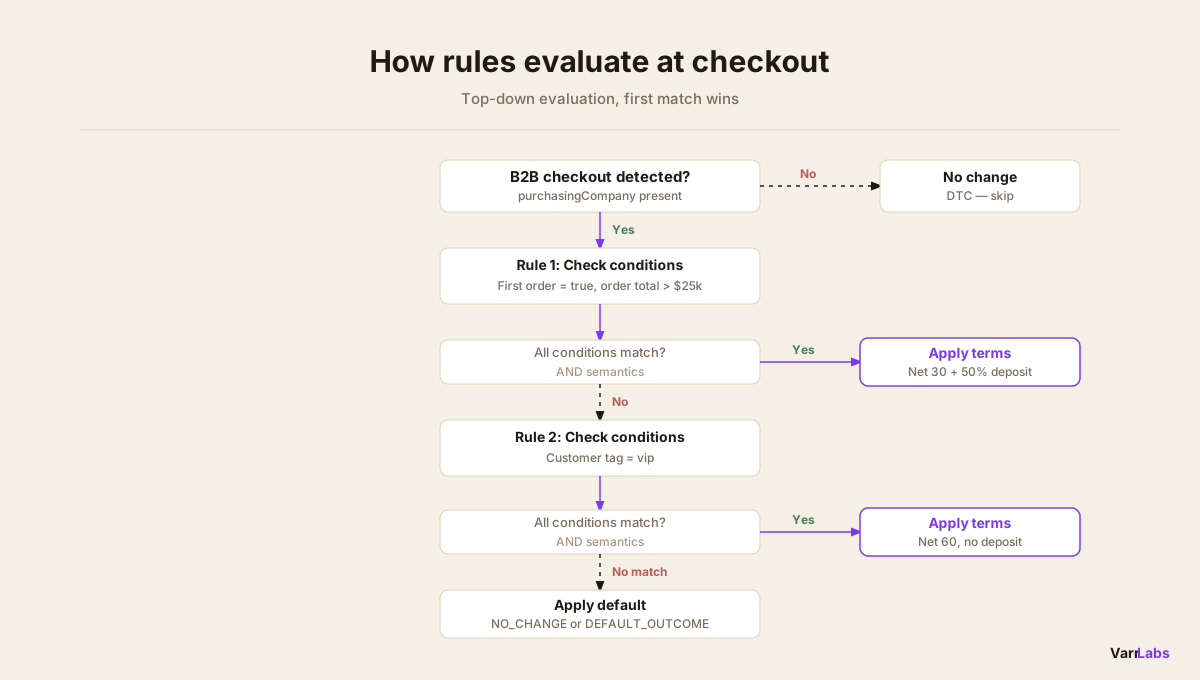
Rules evaluate top-down. First match wins. All conditions in a rule must match (AND semantics). Disabled rules are skipped. If nothing matches, you can configure a default: either keep whatever Shopify's location-level terms are, or apply a specific fallback.
A few concrete examples of what this looks like in practice:
By order value:
- Orders under $5,000: Net 30
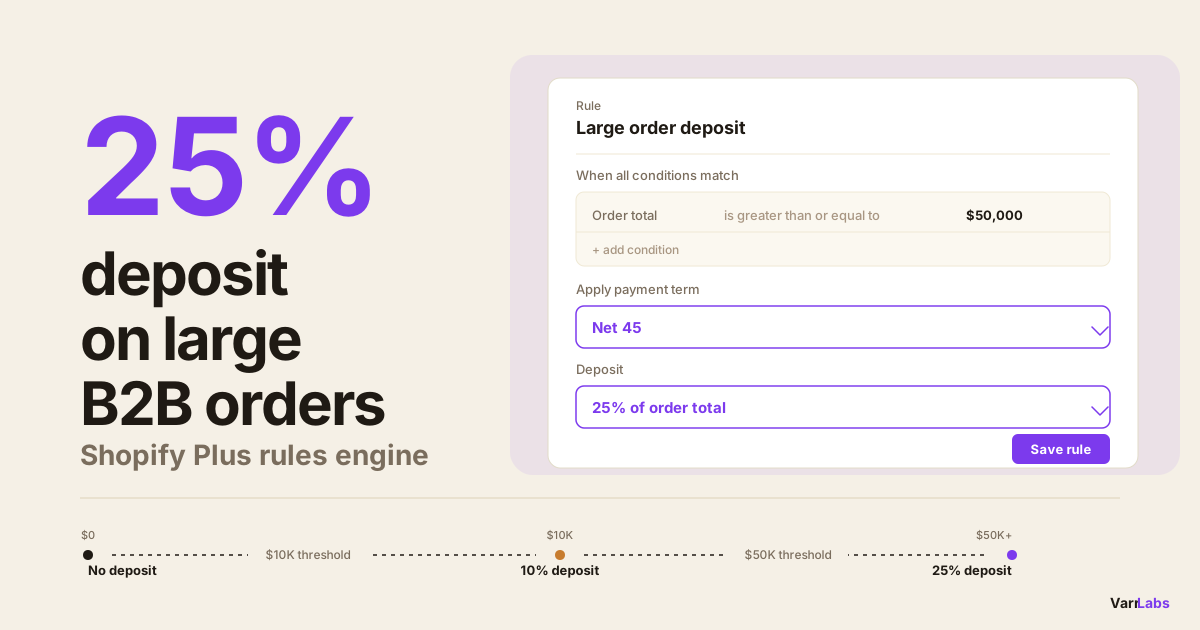
- Orders $5,000–$50,000: Net 30 with 25% deposit
- Orders above $50,000: Net 45 with 50% deposit
By buyer profile:
- Customer tagged
vip: Net 60 - Customer tagged
high-riskoroverdue: Due on fulfillment - First-time buyer: payment required at checkout
By what's in the cart:
- Cart contains items from a custom-manufacturing collection: 50% deposit required
- Standard stock only: Net 30
By company or location:
- Specific company (e.g. Acme Corp): custom negotiated terms applied at the location level, everything else follows standard rules
How deposits work
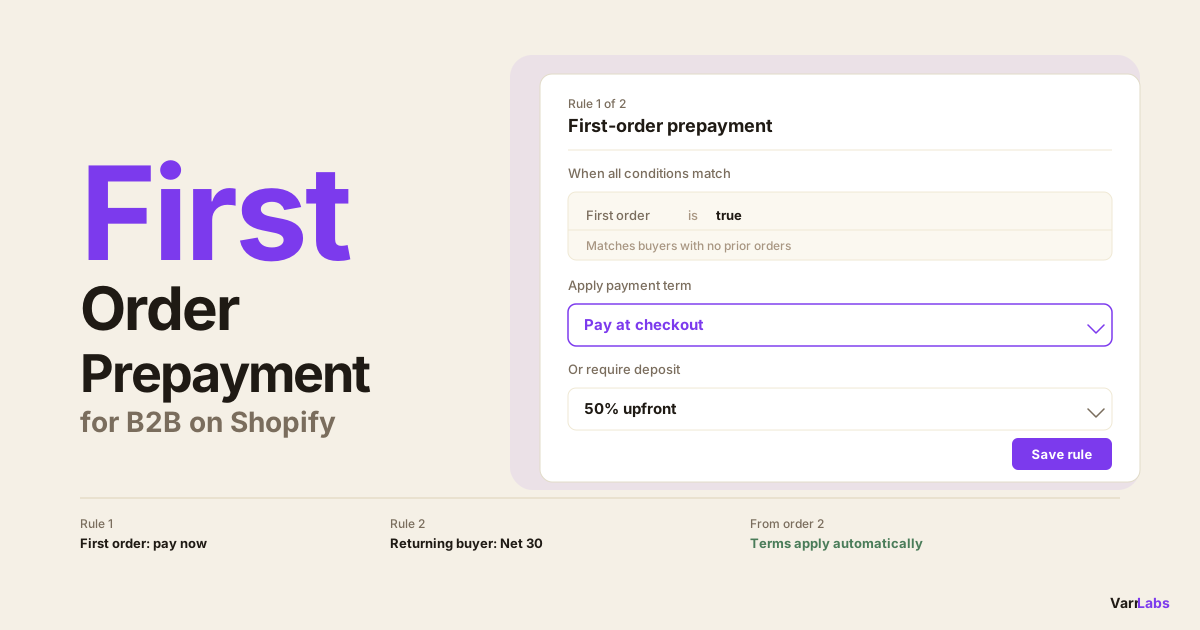
Deposits on Shopify Plus exist but are limited. Natively, you can set a deposit percentage on a company location, and buyers pay that percentage at checkout with the remainder due on the normal terms. The limitation: one deposit percentage, applied to every order.
In a rules engine, deposits become an outcome you can attach to any rule. Two formats:
- Percentage deposit: A percentage of the order total (e.g., 25%, 50%)
- Fixed-amount deposit: A set dollar amount regardless of order size
The deposit outcome is separate from your payment terms outcome. A rule can apply Net 30 with a 25% deposit, Net 45 with a 50% deposit, or no deposit at all depending on conditions.
One thing to be clear about: the deposit Shopify collects at checkout and the payment terms that govern the balance are two different things. A buyer paying a 25% deposit upfront on a Net 30 order pays 25% immediately and the remaining 75% within 30 days. The 30 days starts from when the order is placed.
Why deposits matter more at scale
At 20 B2B accounts, you know your buyers. You know who pays on time and who needs a deposit to feel commitment to an order. At 200 accounts, you can't hold that knowledge manually.
Deposits serve two functions beyond cash flow: they filter out speculative orders from buyers who aren't serious, and they give you partial coverage on large orders before you've invested in fulfillment. A 25% deposit on a $100,000 order is $25,000 in your account before you ship a single item.
A rules engine lets you set deposit thresholds you'd apply manually anyway, and then remove yourself from the decision entirely.
Setting up a dynamic rules engine
TermStack is built on Shopify Functions. It evaluates your rules at checkout in under 5ms, server-side inside Shopify's own infrastructure, with no external API calls. Here's how to get it set up.
The setup process:
Step 1: Install and onboard
Install TermStack from the Shopify App Store. The onboarding wizard walks you through setup and activates the rules engine in your store. No code required.
Plans start at free (up to 10 stored rules, but no publishing) and paid tiers from $99/month. All paid plans include a 14-day trial.
Step 2: Create your first rule
Go to the Rules tab. Click New rule. Give the rule a name you'll recognize when looking at an audit log.
Add conditions using the Condition Builder. Each condition has a type (order total, customer tag, company, etc.), a comparison (greater than, any of, between, etc.), and a value.
All conditions in a rule must match for the rule to fire (AND semantics). If you need OR logic, create separate rules at consecutive priority levels.
Step 3: Set the outcome
In the Outcome Builder, choose a payment terms type:
- No payment terms: Buyer pays at checkout (no net terms extended)
- Net days: Net 7, 15, 30, 45, 60, 90, or a custom number of days
- Due on fulfillment: Payment due when the order is fulfilled
- Due on fulfillment created: Payment due when fulfillment is created
- Due on invoice sent: Payment due when invoice is sent
Then optionally add a deposit: percentage or fixed amount. If you sell made-to-order, the event-based options are worth understanding on their own; see when to use due on fulfillment payment terms.
Step 4: Set rule priority
Drag rules into priority order. Rules evaluate top-down, first match wins. General rules should sit below specific ones. Your "first-time buyer" rule should sit above your "order total above $5,000" rule if you want first-time buyers to always require full payment regardless of order size.
Step 5: Test in the simulator
Before publishing, use the Simulator to test rules against checkout contexts. Select a company and location, enter an order total, add tags, and see which rule fires and what terms get applied. You can simulate against either draft or published versions.
Step 6: Publish
Click Publish. The ruleset compiles and goes live instantly. No code to deploy, no cache to clear. The next checkout against your store will evaluate the updated rules.
Every publish creates a versioned snapshot. You can roll back to any previous version in one click.
When native Shopify isn't enough
TermStack is a rules engine built on Shopify Functions that applies the right payment terms and deposit at checkout automatically, based on conditions you define. Try it free for 14 days.
One useful condition is the buyer's existing payment terms. If a company location already has Net 45 assigned in Shopify, you can write a rule that targets those buyers specifically and layers a deposit requirement on top of their standard terms, without changing the underlying terms. TermStack keeps each location's terms in sync automatically, so new or updated company locations are picked up without any manual work on your end.
Common mistakes with B2B payment terms
Setting and forgetting. Payment terms are a policy. Policies need review. A buyer who earned Net 60 terms two years ago based on consistent high-volume orders might have become a slow-paying account. Without a rules review cadence, you won't catch this until finance flags a problem.
No default behavior set. If none of your rules match, what happens? In TermStack, the fallback is configurable: either keep whatever Shopify's location-level terms are, or apply a specific fallback term you define. If you don't set a sensible default, edge cases fall through to whatever Shopify does natively.
Publishing without testing. The simulator exists for a reason. A misconfigured condition (for example, "greater than" instead of "greater than or equal to" on an order total threshold) means some orders fall into the wrong rule. Test every rule you publish.
Too many rules without priority clarity. When you have 30+ rules, priority order becomes hard to reason about. Keep a naming convention that reflects priority (e.g., "P1 - First order", "P2 - High risk", "P3 - VIP tier") and review priority order whenever you add a rule.
Frequently Asked Questions
Summary
Shopify Plus gives you the foundation for B2B payment terms, but the native setup is one term per company location. That works until you need terms to reflect order size, buyer risk, product mix, or any other variable that changes order to order.
Dynamic payment terms replace the per-location assignment with a rules engine that evaluates conditions at checkout and applies the right terms automatically. Deposits become a conditional outcome you attach to specific rules, not a blanket setting on a location. The audit trail that native Shopify is missing becomes part of every rule creation, edit, and publish. If you're scaling B2B and finding that manual exceptions are eating into your finance team's time, TermStack is the straightforward fix.