Dynamic Deposits on Shopify: Collect 25% Upfront on Large B2B Orders
Learn how to require a 25% deposit on large B2B orders in Shopify Plus using a rules engine, without charging deposits on every order or every buyer.
Key Takeaways
- 1Shopify Plus lets you set one deposit percentage per company location, applied equally to every order from that buyer. Conditional deposits require a rules engine.
- 2A rules engine lets you require a 25% deposit on orders above $50,000, a 10% deposit on mid-size orders, and no deposit on small reorders, all automatically at checkout.
- 3Both percentage deposits and fixed-amount deposits are supported as rule outcomes. The deposit and payment terms are set independently, so you can mix and match.
- 4TermStack evaluates deposit rules at checkout in under 5ms with no external API calls, with version history and one-click rollback on every publish.
Most B2B merchants I talk to have one of two deposit setups: they collect deposits on everything, or they collect deposits on nothing. Neither is right.
Deposits on everything creates friction for your best buyers who've already earned trust. No deposits on anything means you're fully exposed on $150,000 orders from buyers you've never worked with. The sensible policy is somewhere in between: require a deposit when the order size or buyer profile warrants it. For how to size that deposit by scenario, see how much deposit to require on wholesale orders.
Shopify Plus doesn't support that natively. But you can build it with a rules engine. This post covers how dynamic deposits work and how to set up a 25% upfront rule on large B2B orders. If you're also thinking about order-value tiers beyond deposits, see Shopify B2B payment terms by order value.
Why Shopify's native deposit setup falls short
Shopify Plus lets you set a deposit percentage on a company location. Go to Customers → Companies → [Company] → [Location] → Edit payment terms, and you'll find a deposit percentage field alongside the terms type.
That deposit applies to every order from that location. No exceptions, no thresholds, no conditions. If you set 25% on a buyer, every $500 reorder from them requires a $125 deposit, which is pointless. And if you don't set one, every $200,000 first-time purchase goes through with no money down.
The native setup is fine if you have a few accounts with negotiated, unchanging terms. Once you're managing a real B2B catalog with buyers at different risk levels and order sizes, you need something more granular.
Here's where the static model breaks down:
- One percentage per location. You can't vary the deposit by order size, product type, or buyer behavior. Every order from a location gets the same deposit.
- No conditional logic. There's no way to say "require a 25% deposit on orders above $50,000 but not below." That condition doesn't exist in native Shopify.
- No buyer-level exceptions. If you've set a deposit on a location, your best long-term accounts who've earned full trust still hit the deposit requirement on every order.
What a conditional deposit rule looks like
A rules engine lets you define the exact conditions that trigger a deposit requirement.
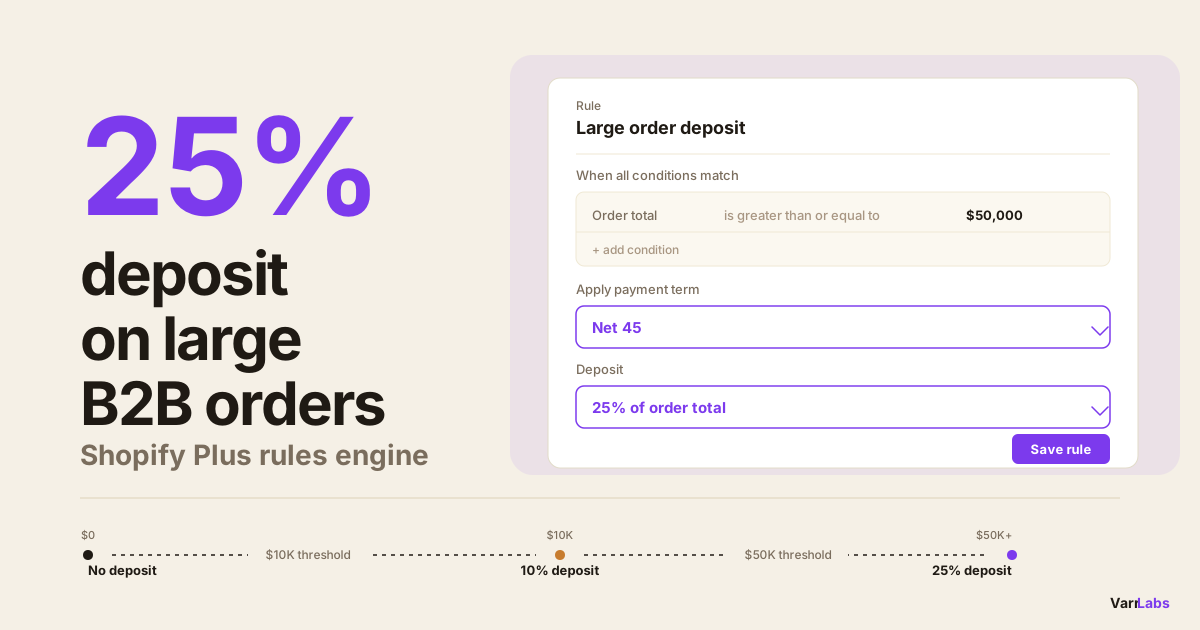
The most common setup: no deposit on small orders, a 25% deposit on large ones.
In practice:
- Order total below $10,000. Net 30, no deposit.
- Order total $10,000–$50,000. Net 30 with 10% deposit.
- Order total above $50,000. Net 45 with 25% deposit.
You can also layer in buyer-level signals:
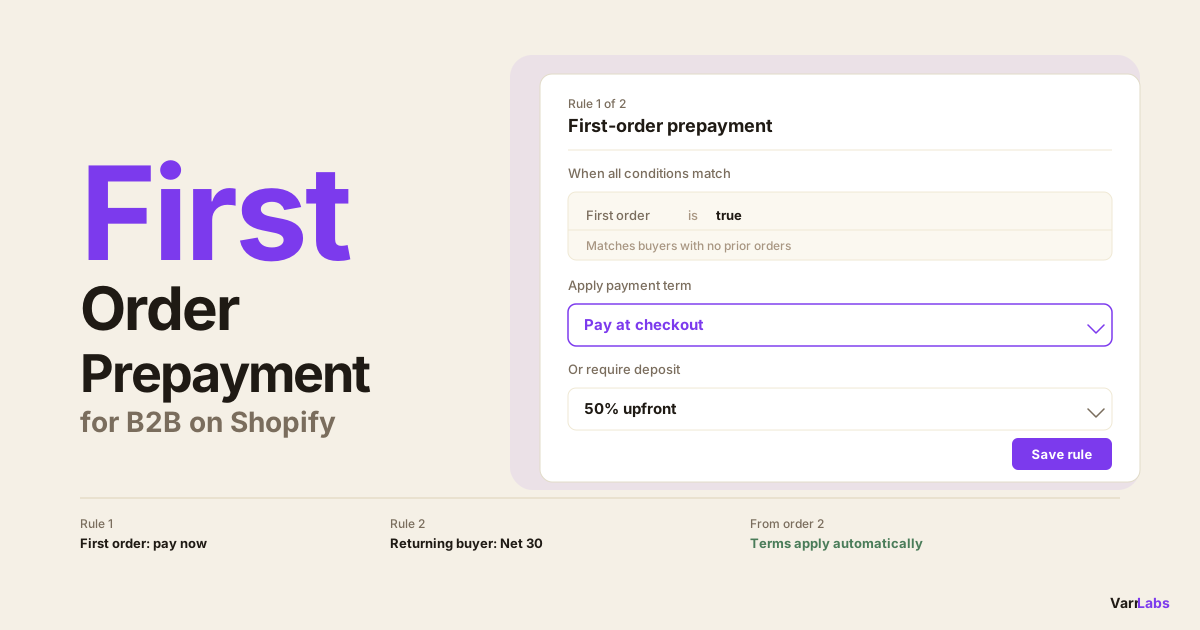
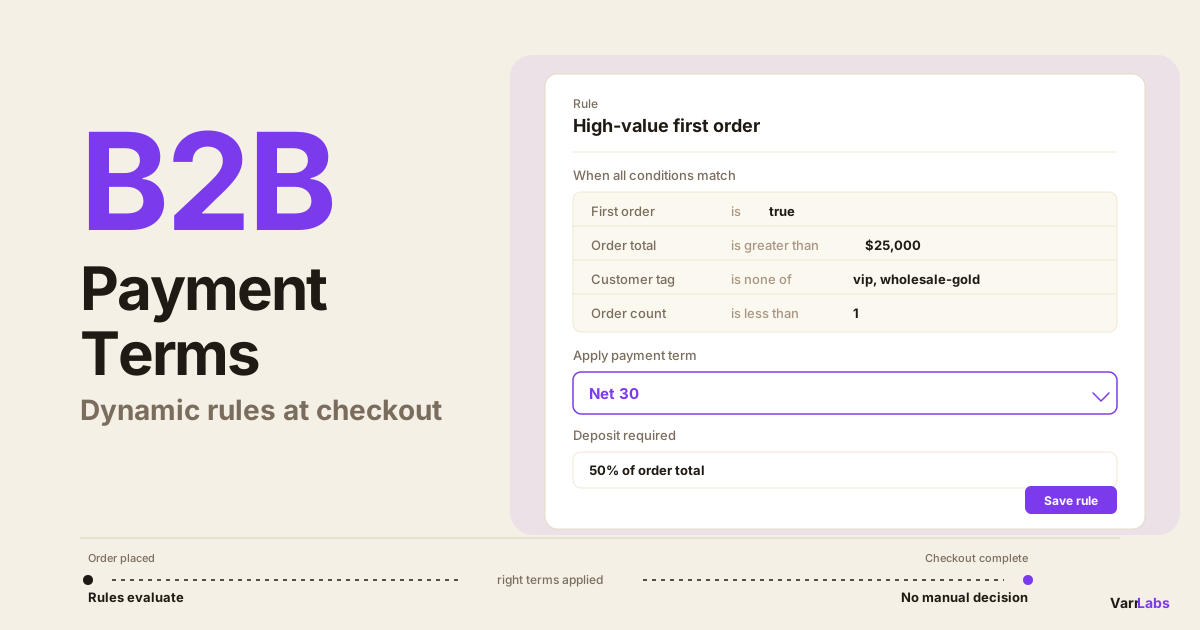
- First-time buyer, any order size. Payment required at checkout.
- Customer tagged
high-risk. Due on fulfillment, no extended terms. - Customer tagged
viporwholesale-gold. Net 60, no deposit regardless of order size.
The deposit becomes an outcome attached to specific conditions, not a blunt setting on a company location.
How the rules evaluate at checkout
Rules evaluate top-down, first match wins. All conditions in a rule must match for the rule to fire. If nothing matches, you configure a fallback: either keep whatever Shopify has set at the company location level, or apply a specific default term.
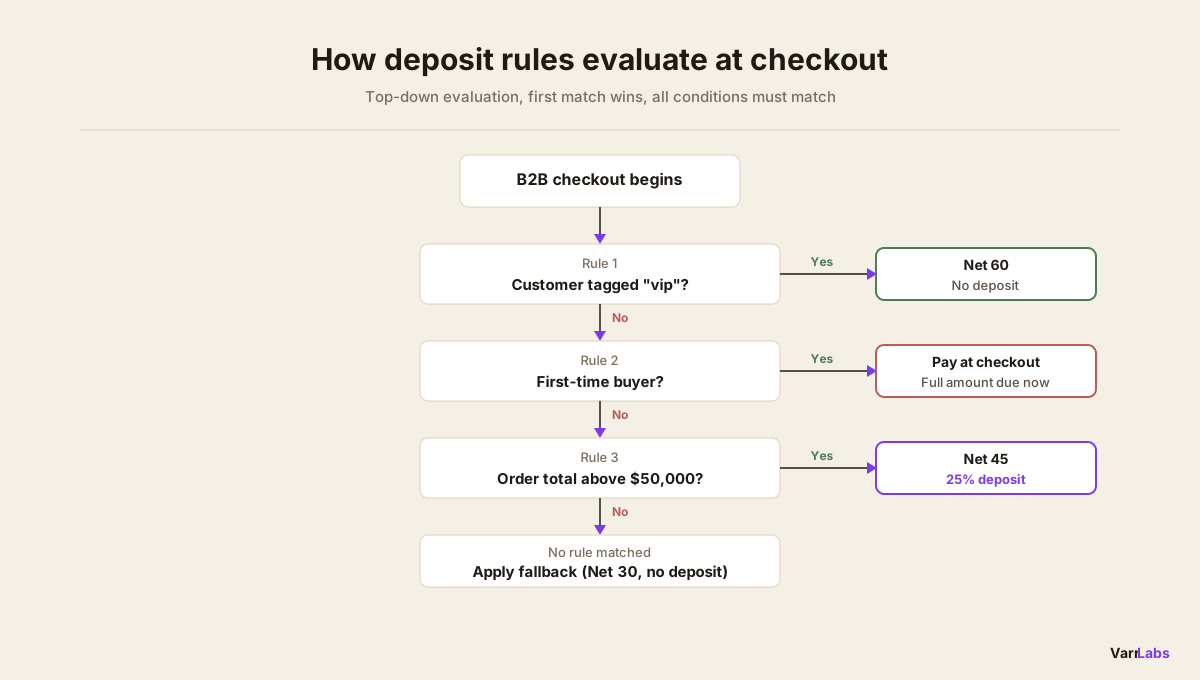
If you want VIP buyers to never hit a deposit rule even on large orders, put the VIP rule above the order-total thresholds. The first match wins and the engine stops there.
This is intentional design. You can construct fairly complex policy logic without building complex rules: you just think about the order in which rules should be checked.
Supported deposit types
Two formats:
- Percentage deposit. A percentage of the order total. A 25% deposit on a $100,000 order means the buyer pays $25,000 at checkout and $75,000 on the terms due date.
- Fixed-amount deposit. A fixed dollar amount regardless of order size. Less common, but useful for scenarios like "always collect $5,000 on custom manufacturing orders."
The deposit and the payment terms are separate components of the same rule outcome. A rule can apply Net 45 with a 25% deposit. A different rule can apply Net 30 with no deposit. You can mix and match however your credit policy calls for.
Setting up a 25% deposit rule with TermStack
TermStack is a rules engine built on Shopify Functions. It evaluates your rules at checkout in under 5ms, server-side inside Shopify's own infrastructure, with no external API calls. Here's how to set up the large-order deposit rule.
Step 1: Install and activate
Install TermStack from the Shopify App Store. The onboarding wizard handles activating the payment customization function in your store. No developer required.
Paid plans start at $99/month and include a 14-day trial. The free plan lets you store up to 10 rules but can't publish any.
Step 2: Create the large-order deposit rule
In the Rules tab, click New rule. Name it something descriptive: "Large order deposit — above $50K".
Add one condition: Order total is greater than or equal to $50,000.
In the Outcome Builder:
- Payment terms: Net 45 (or your standard large-order terms)
- Deposit: 25%
Save the rule.
Step 3: Create your mid-tier rule (optional)
If you want a tiered structure, add another rule: "Mid-size order deposit — $10K to $50K".
Conditions: Order total is between $10,000 and $50,000.
Outcome: Net 30, 10% deposit.
Step 4: Create your baseline rule
A catch-all for smaller orders: "Standard — under $10K". Order total less than $10,000. Net 30, no deposit.
Step 5: Set priority order
The large-order rule sits above the mid-tier rule, which sits above the baseline. Drag them into that order. Rules evaluate top-down, so the first match determines the outcome.
If you have buyer-level rules (VIP, high-risk, first order), put those above the order-total rules so they take precedence.
Step 6: Test in the simulator
Before publishing, open the Simulator. Select a company and location, set an order total above $50,000, and confirm the right rule fires and the 25% deposit appears in the output. Test a $5,000 order too, to confirm no deposit applies there.
Step 7: Publish
Click Publish. The ruleset compiles and goes live immediately. Every publish creates a versioned snapshot, so if something looks wrong you can roll back to the previous version in one click.
When native Shopify isn't enough
TermStack lets you set deposit rules by order size, buyer tier, or product type. The right deposit applies at checkout automatically. Try it free for 14 days.
One useful condition is the buyer's existing payment terms. If a company location already has Net 45 assigned in Shopify, you can write a rule that targets those buyers specifically and layers a deposit requirement on top of their standard terms, without changing the underlying terms. TermStack keeps each location's payment terms context in sync automatically, so new or updated company locations are picked up without any manual work. For more detail on how rules combine with buyer profiles, see how to require deposits on B2B orders in Shopify Plus.
Common mistakes to avoid
Setting the deposit threshold too low. A 25% deposit on $2,000 orders annoys buyers without meaningful risk protection. Set thresholds where the order size actually warrants the extra friction.
Forgetting buyer-level exceptions. If you have long-term accounts that should never hit a deposit requirement, create a rule with a customer tag condition and put it above your order-total rules in priority. Don't assume the order-total rules will work correctly for every buyer.
Not testing before publishing. The simulator shows exactly which rule fires for a given checkout context. Use it before publishing, especially when setting up tiered rules with overlapping order total ranges.
No fallback configured. If none of your rules match, what happens? Configure your fallback behavior explicitly. Either let Shopify's location-level terms apply, or set a specific default. Don't leave it ambiguous.
Frequently Asked Questions
Summary
Shopify Plus gives you deposit support but not deposit logic. You get one percentage per company location, applied to every order. That's not a policy; it's a blunt setting.
A rules engine built on Shopify Functions lets you define the deposit you'd actually want: 25% on orders above $50,000, nothing below, with buyer-level exceptions for your best accounts. The evaluation happens at checkout in milliseconds, with no manual intervention from your team. If you're scaling B2B and need your deposit policy to reflect your actual credit agreements, TermStack is the direct path there.