Shopify B2B in 2026: What's on All Plans vs Plus-Only
Since April 2026, foundational Shopify B2B runs on every paid plan. See exactly what's native across all plans and what still needs Shopify Plus.
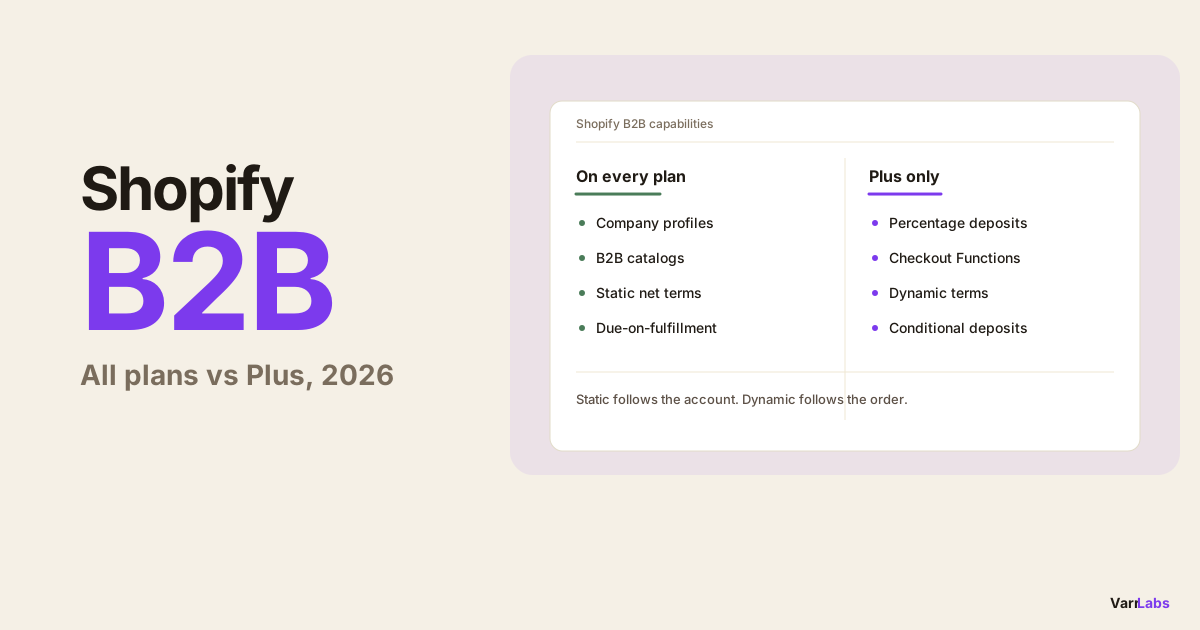
Key Takeaways
- 1Since April 2026, foundational Shopify B2B (company profiles, catalogs, and static net terms) runs on every paid Shopify plan.
- 2Plus-only in 2026: percentage deposits, checkout customization via Functions, and any payment terms that change based on the order.
- 3The decision test: if your terms follow the account, any paid plan works. If they follow the order, you need Shopify Plus.
- 4Static terms assign one template per company. Dynamic terms read the cart at checkout and pick the term by conditions.
- 5TermStack ships a Payment Customization Function and a no-code rules engine so Plus merchants set conditional terms without code.
If you sell wholesale, you've probably been told Shopify B2B means Shopify Plus. That was true for years. As of 2026, it's only half true.
Since April 2026, foundational Shopify B2B runs on every paid plan. Company profiles, B2B catalogs, and static net terms are no longer locked behind Plus. What stayed Plus-only is the automation layer: deposits, checkout customization through Functions, and any payment terms that change based on the order.
So the real question isn't "do I need Plus for B2B." It's "do I need Plus for the kind of B2B I run." This post answers that with a plain feature matrix and a decision test you can apply in about a minute.
What changed in Shopify B2B for 2026
Two things moved the line in 2026.
- April 2026. Shopify pushed foundational B2B down-plan. Company accounts, per-company catalogs and price lists, and static payment terms became available on every paid Shopify plan, not just Plus.
- Summer 2026 Editions. Shopify Scripts finished retiring on July 1, 2026. Functions are now the only supported way to customize checkout behavior, and Functions stayed Plus-only.
Put those together and you get a cleaner split than merchants expect. The "who is this buyer and what do they normally pay" part of B2B is now table stakes on any plan. The "change the terms at checkout based on this specific order" part still lives on Plus.
| When | What moved | Where it landed |
|---|---|---|
| April 2026 | Company profiles, catalogs, static net terms | All paid plans |
| Summer 2026 | Scripts retired, Functions confirmed as the standard | Functions stay Plus-only |
| Unchanged | Deposits, conditional terms, checkout customization | Plus-only |
The Shopify B2B feature matrix: all plans vs Plus
This is the part worth bookmarking. One row per B2B capability, honest about where it works.
| B2B capability | Basic | Grow | Advanced | Plus |
|---|---|---|---|---|
| B2B company profiles and accounts | Yes | Yes | Yes | Yes |
| Company-specific catalogs and price lists | Yes | Yes | Yes | Yes |
| Static net terms per company (Net 7 to Net 90) | Yes | Yes | Yes | Yes |
| Due-on-fulfillment terms per company | Yes | Yes | Yes | Yes |
| Percentage deposits on B2B orders | No | No | No | Yes |
| Checkout customization via Functions | No | No | No | Yes |
| Dynamic terms by order value, buyer history, or cart | No | No | No | Yes |
Read it top to bottom and the pattern is obvious. Everything static, the stuff you set once per account and forget, is on every plan now. Everything that reacts to a live checkout is Plus.
The eight native terms templates are the same across all of this: Net 7, Net 15, Net 30, Net 45, Net 60, Net 90, Due on Fulfillment, or no terms. What Plus buys you isn't more templates. It's the ability to choose between them automatically.
The "do I need Plus?" test
Here's the whole decision in one question: do your terms depend on the order, or just the account?
- Terms depend on the account. You give Acme Net 30 and Globex Net 60, and that's it. Every Acme order is Net 30 no matter the size. You do not need Plus. Assign the template per company and you're done on any paid plan.
- Terms depend on the order. A first order pays upfront, big orders need a deposit, established accounts earn longer terms. You need Plus, because that logic runs at checkout, and checkout customization is Plus-only.
If you're not sure which camp you're in, ask what happens when a good customer places an unusually large order. If your answer is "same terms as always," you're static. If it's "we'd want a deposit on that one," you're dynamic, and that's a Plus job.
Static vs dynamic terms, with real numbers
Static terms are a fixed label on the account. Say you assign Net 30 to a wholesale buyer. A $600 reorder gets Net 30. An $80,000 opening order from that same buyer also gets Net 30. Shopify reads the company record, not the cart. That's fine when your risk is the same on every order. It's a problem when it isn't.
Dynamic terms read the order and decide. Same buyer, but now:
- First order from a new account: payment due on fulfillment.
- Any order over $25,000: require a 25% deposit. On that $80,000 order, that's $20,000 in your account before you ship.
- Established account, 10+ orders, under $10,000: Net 60 as a loyalty perk.
None of that is possible with static assignment. It needs something evaluating the cart at checkout, which on Shopify means a Payment Customization Function, which means Plus.
If you're not on Plus yet
Good news first: you got a real upgrade in April 2026. Company accounts, catalogs, and net terms cover a lot of wholesale businesses on their own. If your arrangements are stable and per-account, you may never need Plus.
When you do hit the ceiling, you have two honest options.
- Draft orders and manual invoicing. For the occasional deposit or one-off exception, create a draft order, add the deposit as a line, and send the invoice by hand. It works. It does not scale past a handful a week.
- Upgrade to Plus when the manual work becomes the job. The clearest upgrade triggers: you're building draft orders every week just to collect deposits, your credit policy changes with order size, or your sales team spends real time deciding terms order by order. That's the point where checkout automation pays for itself.
Don't upgrade to Plus for B2B you can now do on any plan. Upgrade when you need the checkout to make the decision for you.
When native Shopify B2B isn't enough
On Plus, the Payment Customization Function is the mechanism, but you don't have to build one. That's the gap TermStack fills: it ships the Function and gives you a no-code rules engine in your Shopify admin. You write ordered rules with conditions and outcomes, test them against sample checkouts in a simulator, and publish. From there every B2B checkout gets the right terms automatically, evaluated in under 5ms with no external calls.
The conditions you can work with include order total, customer tags, company or company location identity, whether it's the buyer's first order, total previous order count, cart collections, and the terms already assigned to the company. Combine them with AND logic and you've encoded your whole credit policy.
TermStack turns your credit policy into rules that apply at every B2B checkout automatically, deposits and conditional terms included. Try TermStack free for 14 days →
For the deeper native-versus-app breakdown, see the Shopify B2B payment terms native vs. app guide. For what specifically shifted this year, the Shopify Summer 2026 B2B rundown covers the Scripts retirement in detail.
Frequently asked questions
Summary
The 2026 line is cleaner than the old "B2B means Plus" rule. Foundational B2B, the company accounts and static net terms most wholesale businesses run on, is on every paid plan now. Plus is what you pay for when the checkout itself needs to make decisions: deposits, conditional terms, anything that reacts to the order.
Run the test. If your terms follow the account, any paid plan does it. If they follow the order, you're on Plus, and a rules engine like TermStack turns that Function into policy you can manage without writing code.

