Running B2C and B2B with Net 30 on the Same Shopify Store
Running DTC and wholesale on the same Shopify Plus store? Here's how checkout separation works, how to set up Net 30 for B2B buyers, and where the native setup falls short.
Key Takeaways
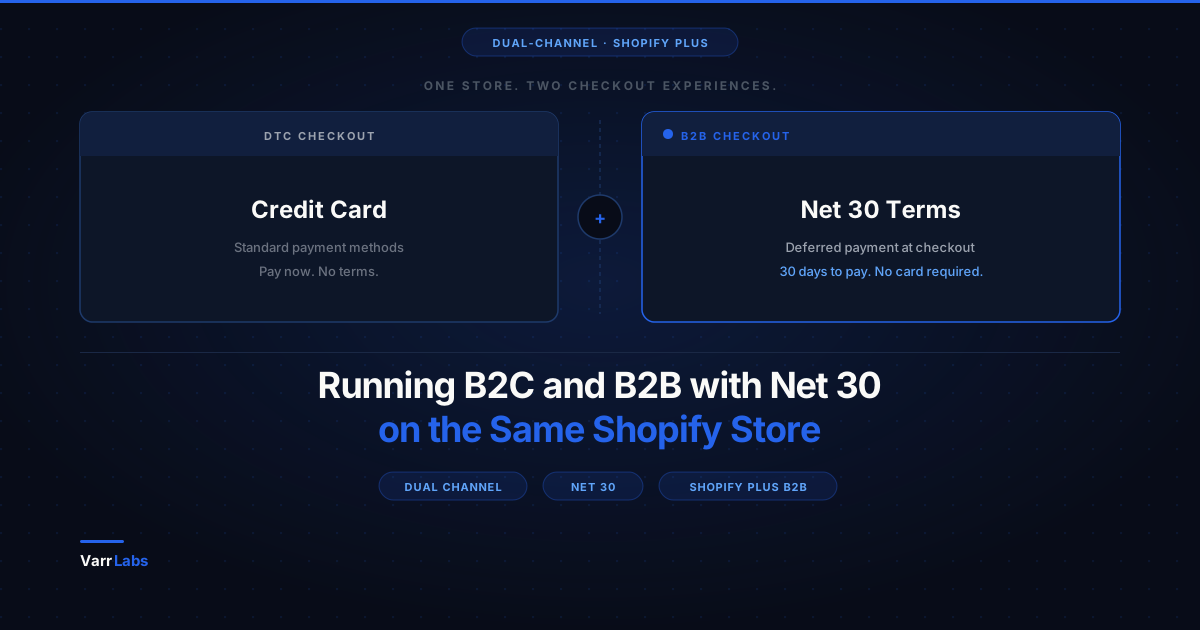
- 1Shopify Plus automatically separates B2B and DTC checkout via a purchasing company flag. DTC buyers never see Net 30 or any payment terms options.
- 2Native Net 30 setup takes five minutes per company location: Customers → Companies → select company → edit Payment Terms → Net 30.
- 3The native setup is static. Every order from a buyer gets the same terms regardless of order size, history, or tier.
- 4For conditional logic like first-order deposits or size-based terms, the Payment Customization Function API or a rules engine like TermStack handles it without touching DTC checkout.
A lot of merchants land on Shopify Plus because they're growing their wholesale side while still running DTC. Same catalog. Same inventory. Two very different buyer relationships.
The question that comes up fast: what happens to payment terms when your B2B customers expect Net 30 and your DTC customers just swipe a card?
This post walks through exactly how that works on Shopify Plus, where the native setup holds up, and where you'll need to go beyond it. If you're new to B2B payment terms entirely, start with the complete guide to B2B payment terms on Shopify Plus.
How Shopify Separates B2B and B2C at Checkout
The good news: Shopify Plus keeps these two buyer types completely separate at checkout.
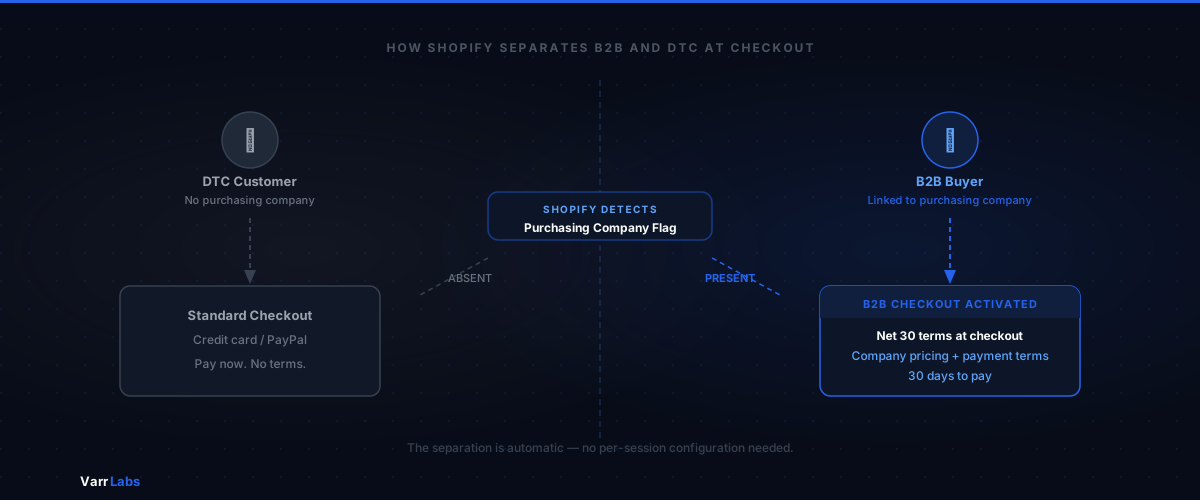
When a B2B buyer logs in, Shopify detects the presence of a "purchasing company" on the session. That's the flag that activates all the B2B behavior: payment terms, net days, company-level pricing, and so on. DTC customers don't have a purchasing company. So they go through the standard checkout: credit card, PayPal, whatever payment methods you've enabled.
The separation is automatic. You don't configure it per-session or build logic around it. It's baked into how the B2B checkout works.
This means if you set up Net 30 terms for your wholesale accounts, DTC shoppers never see that option. They can't accidentally select "pay in 30 days." Net 30 doesn't even appear in their checkout.
That's the foundation. The rest of this article is about building on top of it correctly.
Setting Up Net 30 for B2B Buyers
Shopify Plus assigns payment terms at the company location level. Here's the path:
- Go to Customers → Companies in your Shopify admin.
- Open the company you want to configure.
- Find the company location — most companies start with one, but you can have multiple (e.g., separate billing entities for the same customer).
- Under the location, find Payment terms and click edit.
- Select Net 30 from the dropdown and save.
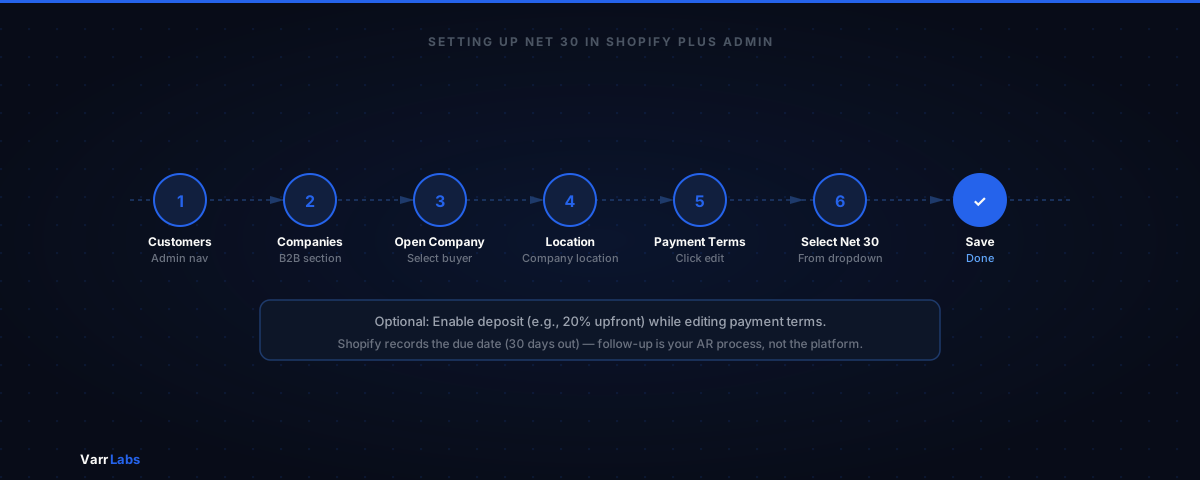
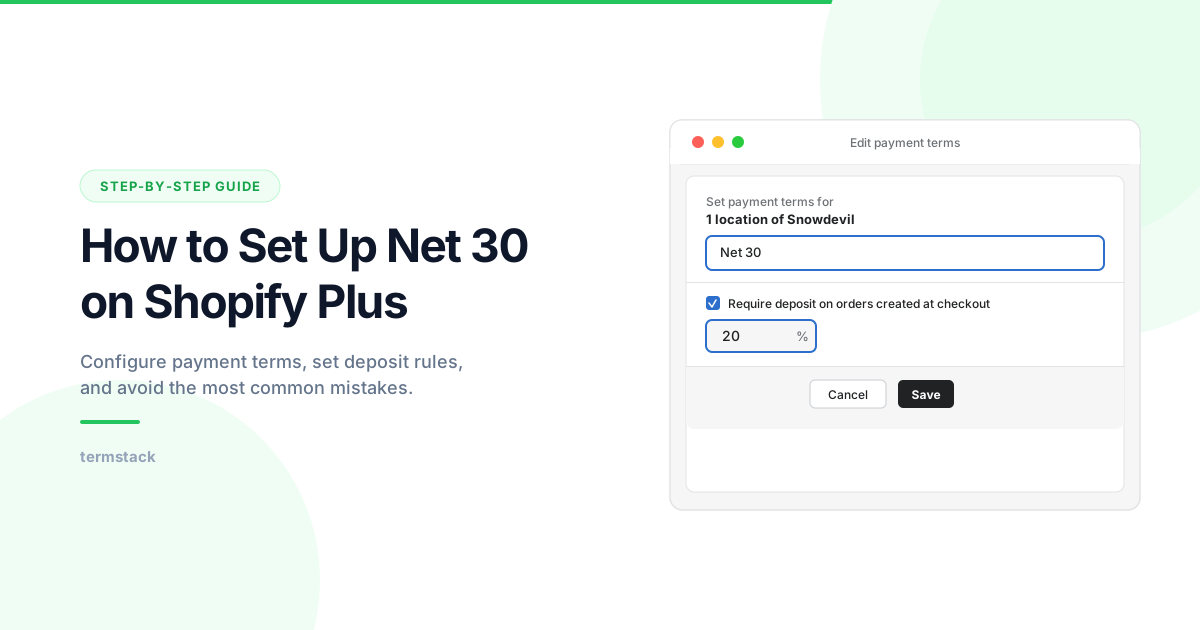
That's it for the basic setup. When that buyer logs in and goes through checkout, they'll see payment terms instead of a payment method. The order gets placed, Shopify records the due date (30 days out), and they can pay from their customer account portal before it comes due.
One thing to be clear on: Shopify creates the terms record and shows the due date. It doesn't automatically chase overdue payments. That's on your AR process, not the platform.
For a deeper walkthrough of this setup, see the guide on how to set up Net 30 payment terms on Shopify Plus.
Where the Native Setup Runs Into Limits
The static-per-location model works when your B2B operation is simple: one set of terms for all orders from a given company. But most merchants hit edge cases faster than they expect.
New vs. established buyers. When a new wholesale account signs up, you probably don't want to extend Net 30 immediately. You might want "Due on fulfillment" for their first three orders, then Net 30 once they've proven they pay on time. With native settings, you'd have to manually update their company location terms each time. That's fine when you have ten accounts. At a hundred, it's a real problem.
Order size. A $500 order from a wholesale buyer is different from a $40,000 order. Your finance team probably has different risk tolerance for each. Natively, there's no way to say "Net 30 for orders under $10K, but require a 25% deposit on anything above that." Same buyer, same location, same terms, regardless of what's in the cart.
Multiple buyer tiers. If you have tiered wholesale pricing (distributor, reseller, retail), you likely want tiered terms to match. Distributors might get Net 60. Resellers get Net 30. New retailers pay upfront. Managing that manually across company locations becomes error-prone fast.
First-order risk. First B2B orders carry the highest default risk. You may want to enforce a deposit on first purchases across the board, then remove it after the relationship is established. That's not configurable natively.
These are the situations where the native setup forces you back to manual intervention.
Adding Dynamic Terms Without Touching Your DTC Checkout
The Shopify Payment Customization Function API lets you add conditional logic to payment terms at checkout. Rules you define run at checkout time and determine which terms apply, based on conditions like order total, buyer history, customer tags, or which company is placing the order.
The key detail: these Functions only activate when a purchasing company is present. When a DTC buyer checks out, the Function returns no operations and the standard checkout runs untouched. Your DTC experience is completely isolated.
For merchants who want this kind of rule-based logic without writing code or managing a custom Function (the API requires version 2025-07 or later and supports up to 25 customizations per store), TermStack provides a no-code rules engine that handles exactly this. You define conditions and outcomes, evaluated top-down at each B2B checkout, and it applies the right terms automatically.
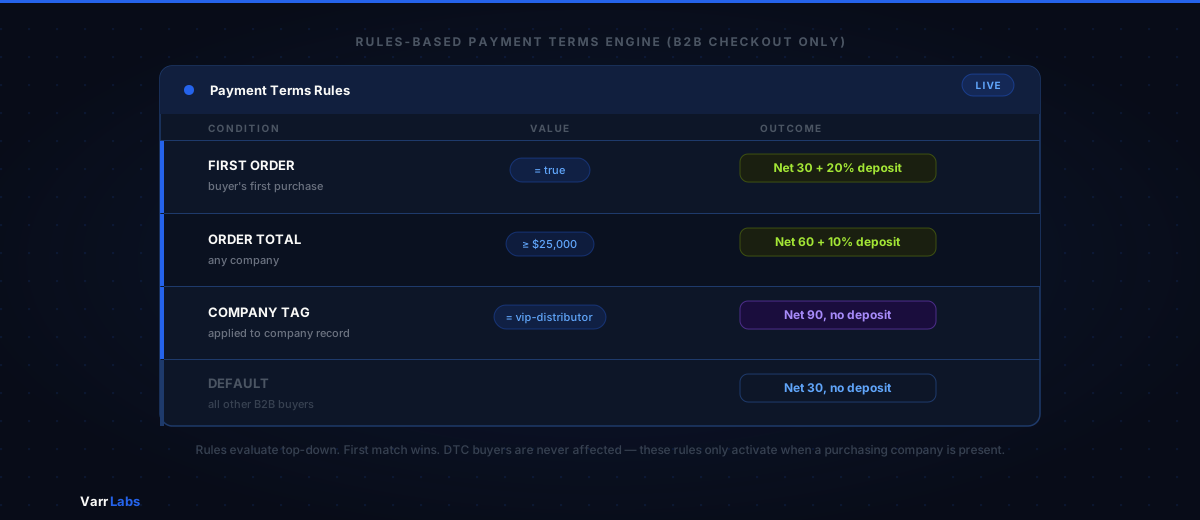
A few examples of what that looks like in practice:
- First-order rule. If
First Order = true, apply Net 30 + 20% deposit. Otherwise, fall through to the next rule. - Order size rule. If
Order Total >= $25,000, apply Net 60 with a 10% deposit. IfOrder Total < $25,000, apply Net 30 with no deposit. - VIP buyer rule. If company is tagged
vip-distributor, apply Net 90. All other B2B buyers get Net 30.
Rules evaluate top-down. The first one that matches wins. If nothing matches, a configurable default kicks in, so you're never leaving a buyer in an undefined state.
None of this touches DTC. It's fully scoped to B2B checkouts.
TermStack lets you build rules like "Net 30 under $10K, deposit required above $25K" with a visual editor, and a built-in simulator to test before going live. Try TermStack free for 14 days →
Getting the Dual-Channel Setup Right
A few things are worth getting right before you go live with a mixed B2C/B2B store on payment terms.
Make sure your companies are actually configured. Payment terms only apply to buyers Shopify recognizes as belonging to a company location. If a wholesale buyer checks out without being tied to a company, they'll hit the DTC flow. This is usually a data hygiene problem. Make sure every B2B customer account is linked to a company location in your admin.
Test with a real B2B account before launching. Create a test company, link a test customer, and run through checkout. Confirm the terms appear as expected. Confirm DTC buyers on a separate test account see none of it. Shopify's sandbox environment or a staff-access account works fine for this.
Define your fallback terms. What terms should apply when a B2B buyer doesn't match any rule? "Net 30" is a safe default for most merchants. "Due on fulfillment" is more conservative. Whatever you choose, make sure it's intentional. Don't leave it blank.
Think about deposits early. Deposit requirements are easier to add up front than retrofit later. Buyers get used to what they see at checkout. If you introduce a deposit requirement on existing accounts six months after launch, expect pushback. Build your deposit logic into the initial ruleset.
Keep B2B and DTC pricing catalogs separate. This isn't directly related to payment terms, but it's the other common issue merchants hit. Make sure your B2B buyers are seeing B2B pricing via price lists or company-specific catalogs, and not the public retail prices. Shopify Plus supports this natively via the B2B catalog feature. Just make sure it's connected to the right company locations.
What the Split Actually Looks Like
To make this concrete: a merchant running both channels might end up with a setup like this.
DTC buyers check out normally. Shopify checkout, card payment, no terms. Nothing changes for them.
B2B buyers see payment terms at checkout. The specific terms depend on which rule fires first. A new distributor placing their first order over $20K might see "Net 30 + 20% deposit." A returning buyer with 10+ orders who's tagged as approved-credit might see "Net 60, no deposit." If no rule matches, the default applies.
The two flows never touch each other. One store. Two checkout experiences. Completely separate.
The Practical Takeaway
Running B2C and B2B on the same Shopify Plus store is supported by the platform. The separation happens automatically at the checkout level. The native setup works for simple cases: one set of terms per company, manually managed.
Where it falls short is conditional logic. Different terms based on order size, buyer history, or relationship tier require something beyond static per-location settings. That's where the Payment Customization Function API, or an app like TermStack built on top of it, gives you the rules engine the native setup is missing.